Admin Panel
AI Usage Credit Management
AI features like Text-to-Image, Translation, and Background Removal add great value to the platform, and with this enhancement, they are now supported by a structured and transparent usage system.
A simple AI credit mechanism has been introduced, where 1,500 free AI credits will be allocated to your account every month. These AI credits apply only to our platform’s AI-powered features (such as translation, image editing, and enhancements). They are not linked to or deducted from any external AI services (e.g., OpenAI, Google Gemini) that admins use independently.
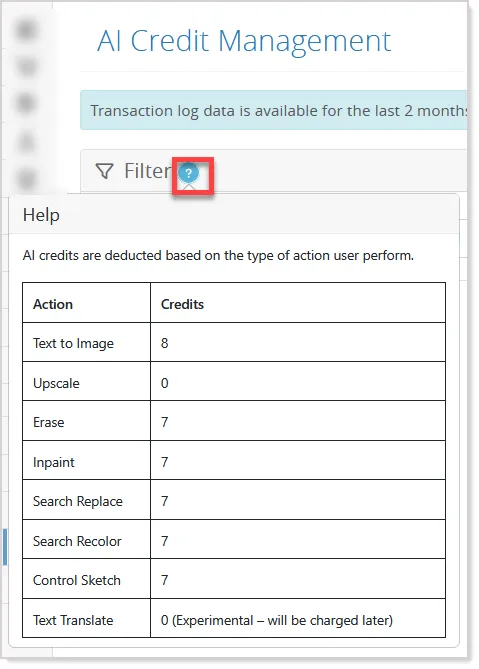
Each AI action consumes a predefined number of credits—for example, Text-to-Image uses 8 credits, Erase uses 7 credits, and Upscale uses 0 credits.
Please note:
- Monthly free credits are valid only for the respective month and will not carry forward if unused.
- Once the monthly allocation is exhausted, additional credits can be purchased at 2,500 credits for $25.
- Purchased credits do not expire and will carry forward until used.
How This Feature Works
When a user performs any AI action, the system first checks whether sufficient credits are available. If enough credits are present, the action is completed instantly, and the required credits are deducted. This entire process happens seamlessly in the background.
When AI credits run low, the system will send an email alert and also display notifications in the dashboard and AI Credit Management Report.
At the same time, all AI usage is automatically tracked. The system records which user acted, how many credits were consumed, and when the action took place. This provides complete visibility into usage patterns and helps you understand how resources are being utilized.
To make monitoring even easier, a dedicated AI Credit Management report under the Reports menu is available in the admin panel:
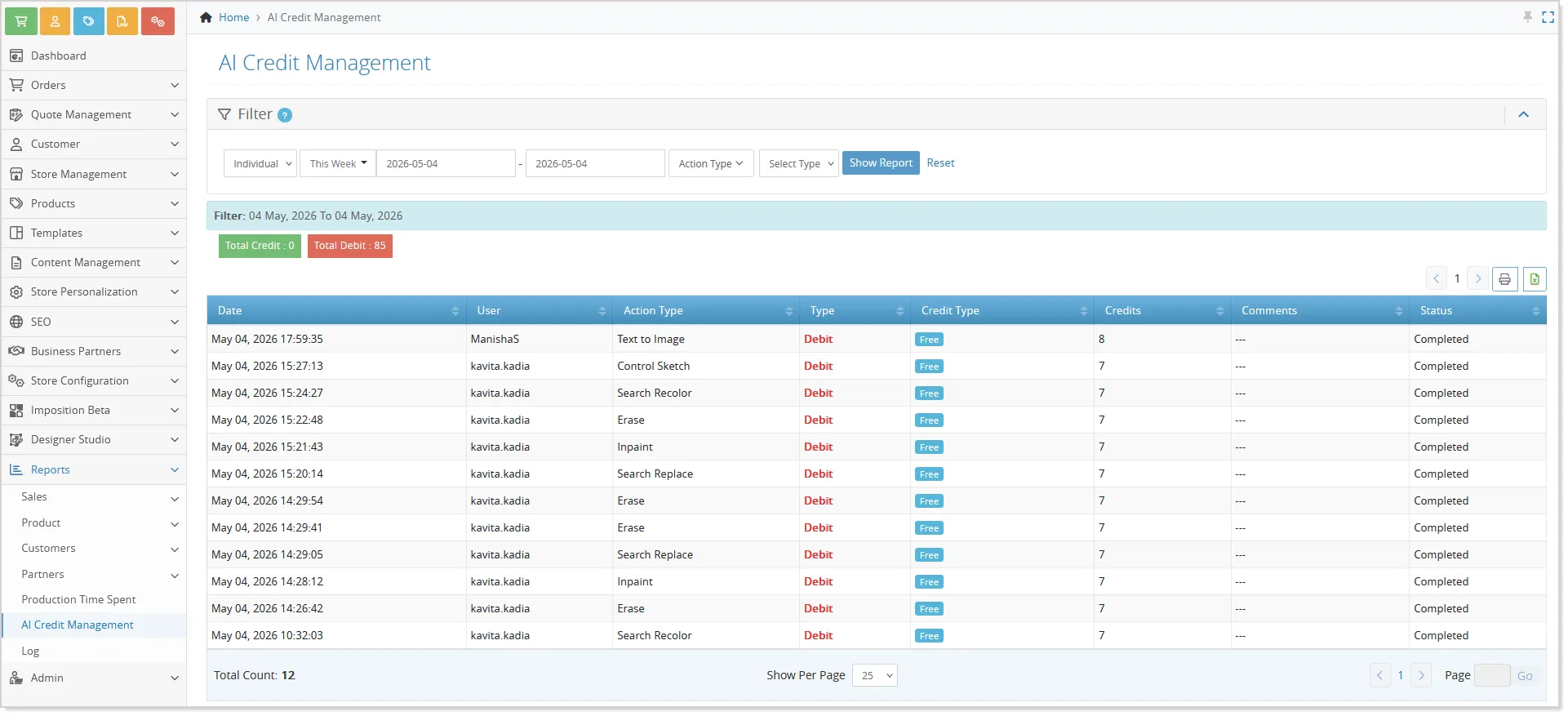
- Here, you can view detailed user-level activity or get a quick summary of total credits used and remaining for each month.
- You can also apply filters such as daily, monthly, or custom date ranges to gain deeper insights.
- You can even check which AI action will consume how many credits using the help icon:
Strengthened User Authentication and Password Policies
Enhanced PCI DSS password security policies have been introduced to strengthen account protection and improve compliance across all user roles.
To comply with PCI-DSS security guidelines, all admin user passwords need to be reset.
- On next login, users will be redirected to set a new password
- Passwords must comply with the updated security policy
- Users cannot reuse their last 3 passwords
- Passwords will be valid for 90 days, after which a reset will be required.
To further strengthen account security, we highly recommend enabling Two-Factor Authentication (2FA) for all admin users.
Admins are now prompted to reset passwords before expiration through a dedicated warning flow, while expired passwords require a mandatory reset before account access is restored.
These enhancements help improve security governance, strengthen password management practices, and support stricter PCI DSS compliance requirements across the platform.
Smarter Cookie Consent for Better Privacy Control
Introducing a smarter and fully compliant cookie consent system that ensures user preferences are properly respected. Now, when a user visits your store, all non-essential cookies, such as analytics and marketing scripts, remain blocked until explicit consent is given.
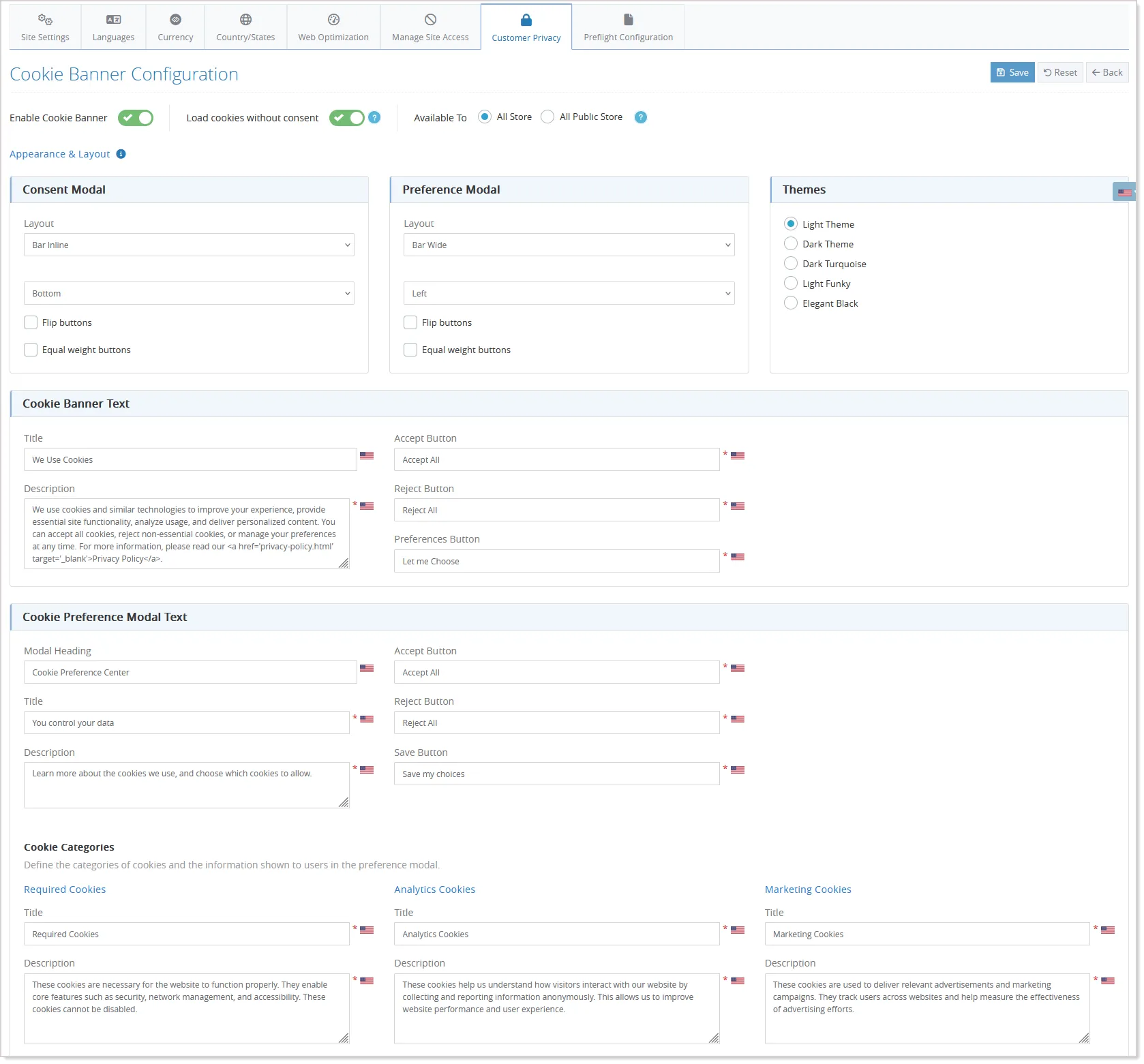
With this update, a fully configurable cookie consent system is introduced, allowing you to control how and when cookies are presented to users.
From the Admin Panel --> Store Configuration --> Site Settings --> Customer Privacy, you can enable or disable the cookie banner, choose where it should appear, customize its layout and design, and define all the text displayed to users—including titles, descriptions, and button labels:
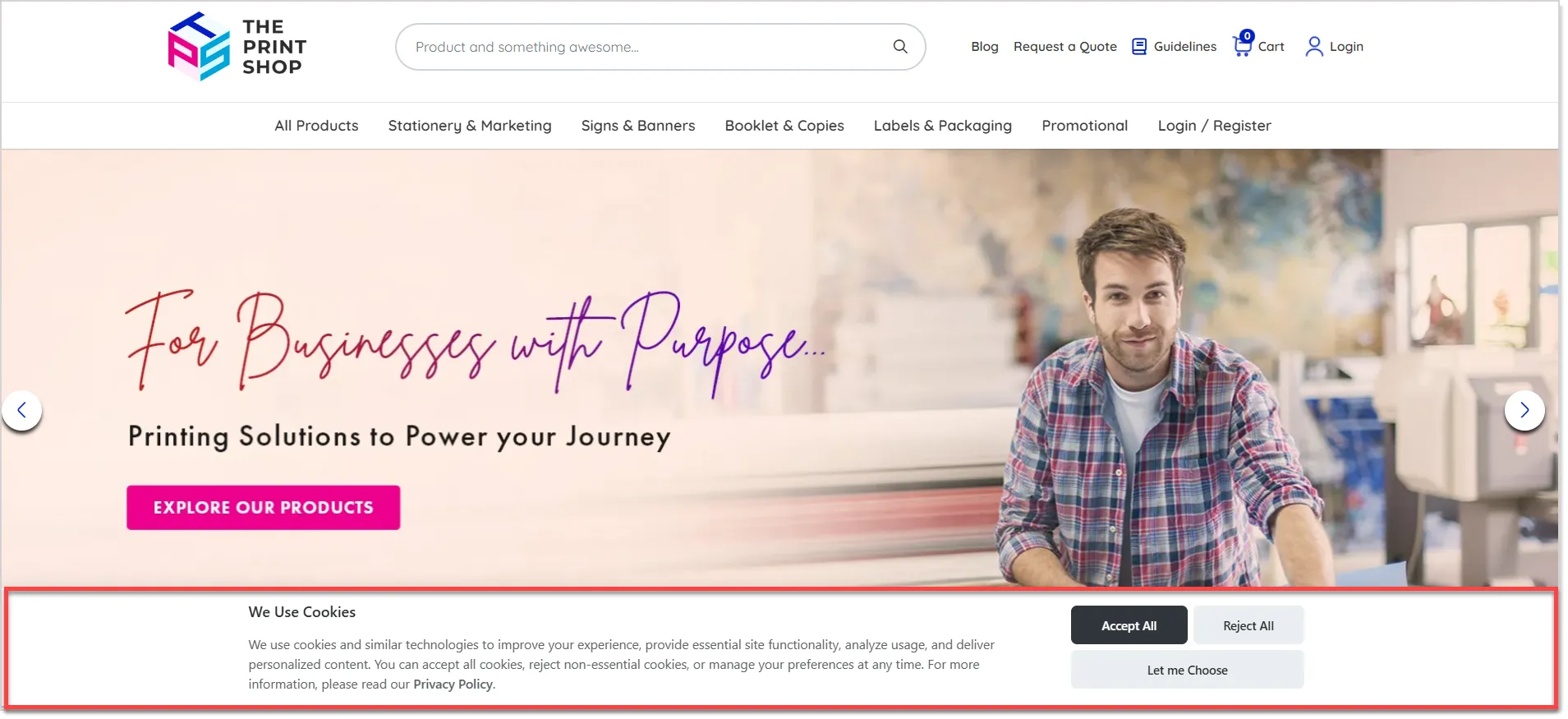
On the storefront, when a user visits for the first time, the cookie consent banner is displayed based on your configuration. Until the user takes action, all non-essential cookies—such as analytics and marketing scripts—remain blocked. Users can choose to accept all cookies, reject non-essential ones, or manage their preferences in detail:
If users choose to manage preferences, they can enable or disable specific categories like Analytics or Marketing while necessary cookies remain always active. This gives users full control over what data is collected, while ensuring essential website functionality continues to work smoothly.
Once a user makes a choice, their consent is securely stored and automatically applied across the site. On future visits, the system remembers their preference and does not show the banner again unless the consent expires or is changed. If the user updates their preference later, the system instantly adjusts—activating or blocking scripts in real time based on the updated selection.
Behind the scenes, all non-essential scripts are intelligently blocked by default and only activated after consent is given. This ensures compliance with regulations like GDPR and aligns your store with modern privacy expectations without affecting performance.
Additionally, all consent actions are logged, giving you visibility into user preferences and helping with compliance tracking.
Enhanced FAQ Management with Advanced Filtering and Export
Managing FAQs is now more efficient with improved filtering and export capabilities in the admin panel. Previously, admins could not filter FAQs based on specific products or categories, and exported data lacked this contextual information, making it harder to organize and analyze FAQs effectively.
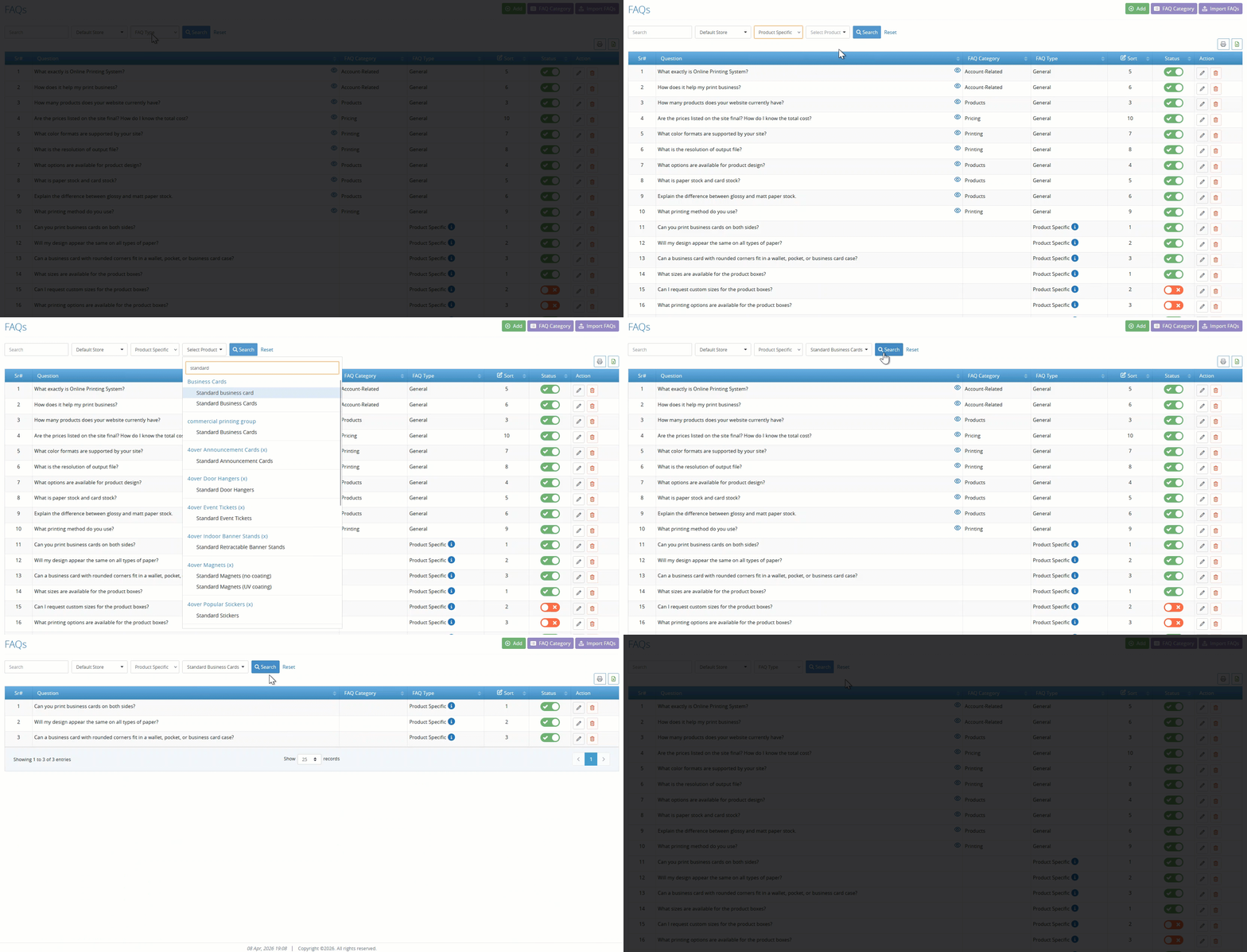
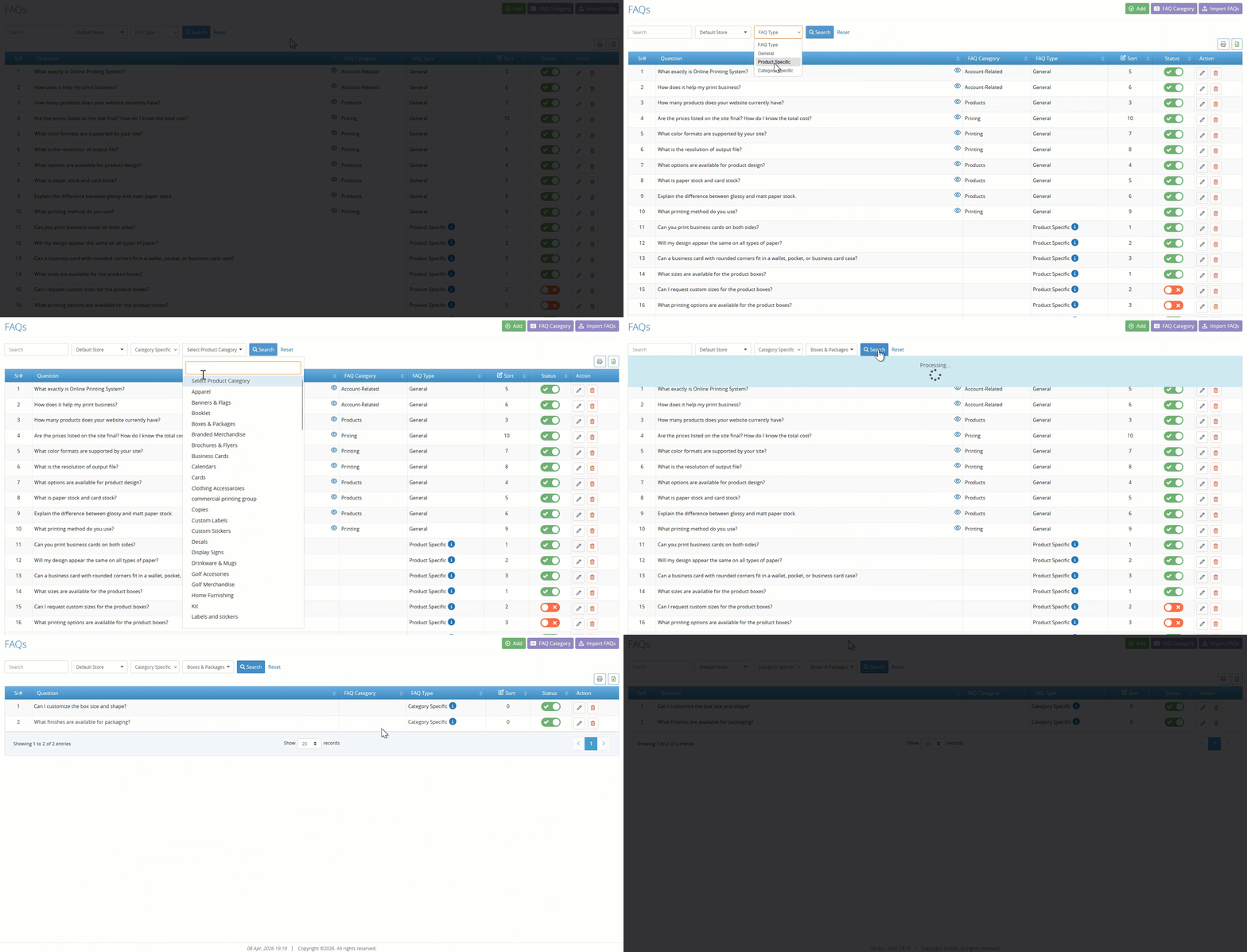
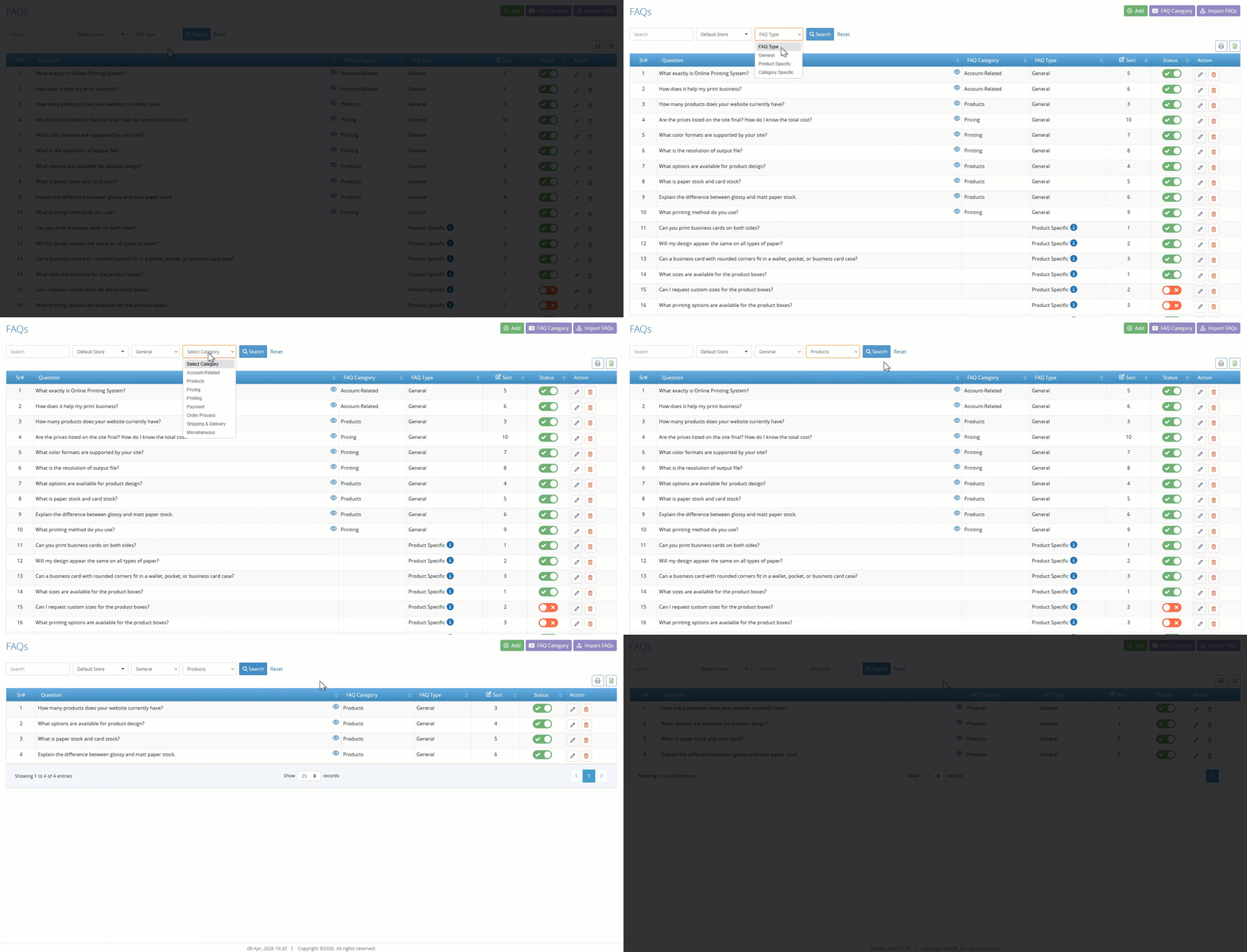
With this enhancement, the FAQs listing screen now dynamically displays filters based on the selected FAQ type:
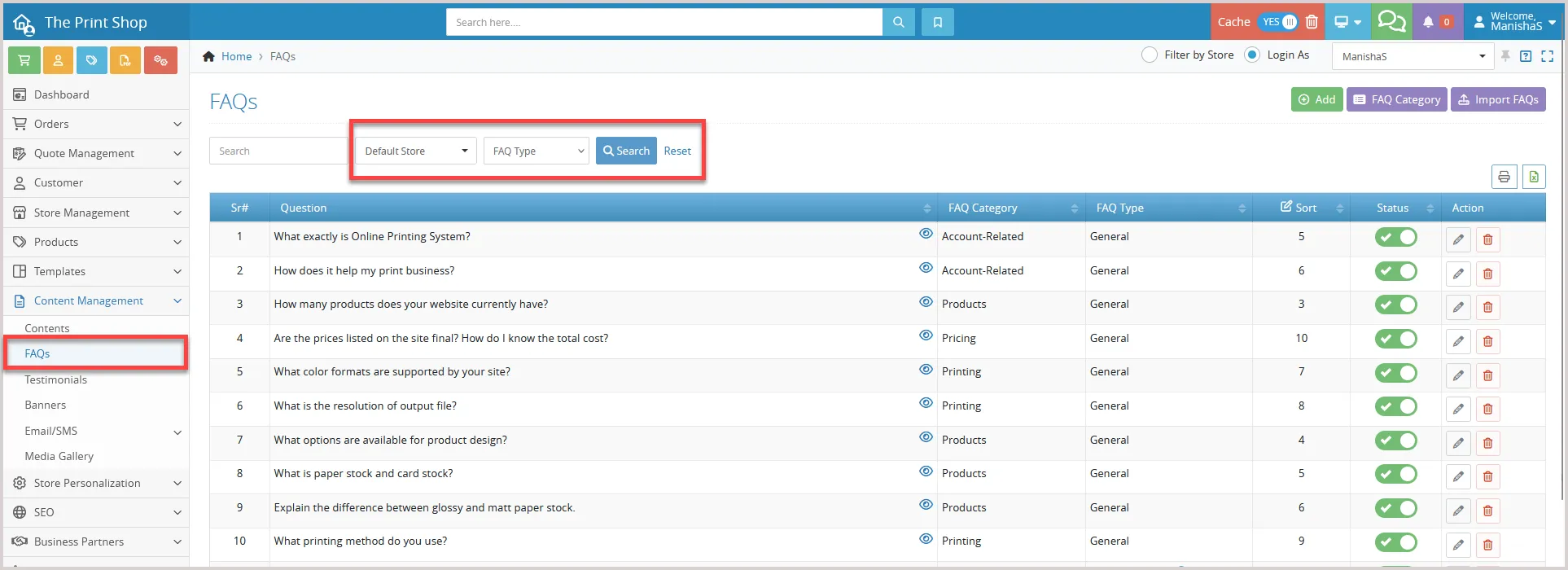
- When the “Product” type is selected, a product filter becomes available, allowing admins to view FAQs linked to specific products:
- Similarly, selecting “Category” type enables a category filter to refine FAQs based on categories.
- For “General” type FAQs, these filters remain hidden, ensuring a clean and relevant interface:
Exporting FAQs
The export functionality has also been enhanced to include product and category details associated with each FAQ.
- When exporting data, admins can now view this information directly in the file, with support for multiple product or category mappings displayed in a structured format.
- Additionally, applied filters are respected during export, ensuring only relevant data is included.
Minor Enhancements
Enhanced Performance and Control for Import Pages
Import template generation is now faster and more efficient with improved control over combination handling. Previously, the system generated combinations using all sizes and options, often creating large datasets that impacted performance and caused delays.
With this enhancement, admins now have the flexibility to control how combinations are generated.
A new option, i.e., Selection Method, allows selection between Multiple (default) and Single:
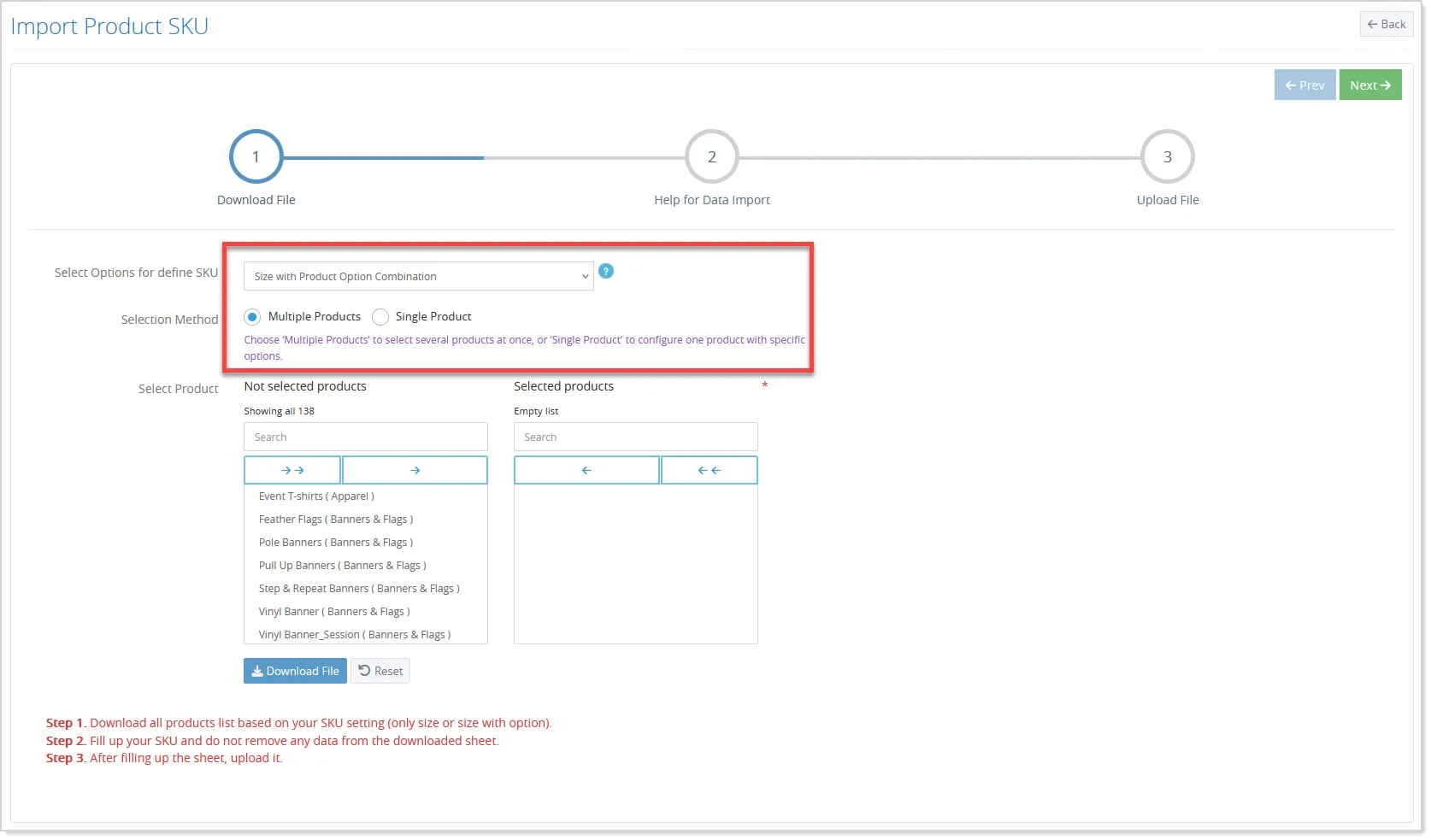
While the Multiple option continues to work as per the existing behavior, the Single option enables admins to select a specific product and choose only the required product options before generating combinations. If predefined combinations exist, the system intelligently reflects the relevant options, while still allowing additional selections if needed.
The system now generates combinations only for the selected options, significantly reducing unnecessary data processing. It also validates inputs by ensuring that a product is selected in Single mode and that at least two product options are chosen to generate valid combinations.
To further optimize performance, the system calculates the total number of combinations before generating the file. If this exceeds a predefined limit, the process is stopped, and a warning message is displayed. This prevents large file generation and ensures system stability.
These performance enhancements are applied across multiple import-related pages, including Import Production Days, Import Product Weight, Import Product SKU, Product Import Stock, and Import Package Configuration, ensuring smoother processing for Size with Product Option combinations.
In addition, optimizations have been implemented across related areas such as, Stock History, Production Days, Products SKU, and Product Weight pages to improve response time, reduce database load, and deliver a faster and more stable admin experience.
Accurate Discount Calculation Before Tax Application
We’ve improved the discount calculation logic to ensure discounts and coupons are applied before tax, resulting in more accurate pricing. Previously, discounts were applied directly to the final amount, which already included tax, leading to incorrect totals.
With this update, the system now follows a proper calculation sequence. It first determines the base price by excluding tax from the total amount, then applies the discount or coupon to this base price, and finally recalculates the applicable tax on the discounted value.
For example, consider a product with a final price of 150, where this amount already includes 50% tax, and a discount of 10 is applied.
Instead, the system now follows a structured calculation flow:
Step 1: Extract Base Price (Excluding Tax) Base Price = 150 ÷ 1.5 = 100
Step 2: Apply Discount Discounted Price = 100 − 10 = 90
Step 3: Recalculate Tax Tax = 90 × 50% = 45
Step 4: Final Amount Final Amount = 90 + 45 = 135
This approach ensures that discounts are applied correctly, tax is calculated on the reduced amount, and the final pricing remains accurate and aligned with standard taxation practices.
Test Email Templates with Dummy Data
Sending emails without knowing how they’ll actually look can lead to errors in content, formatting, or missing data. To make this easier, you can now test email templates using dummy data before sending them to customers.
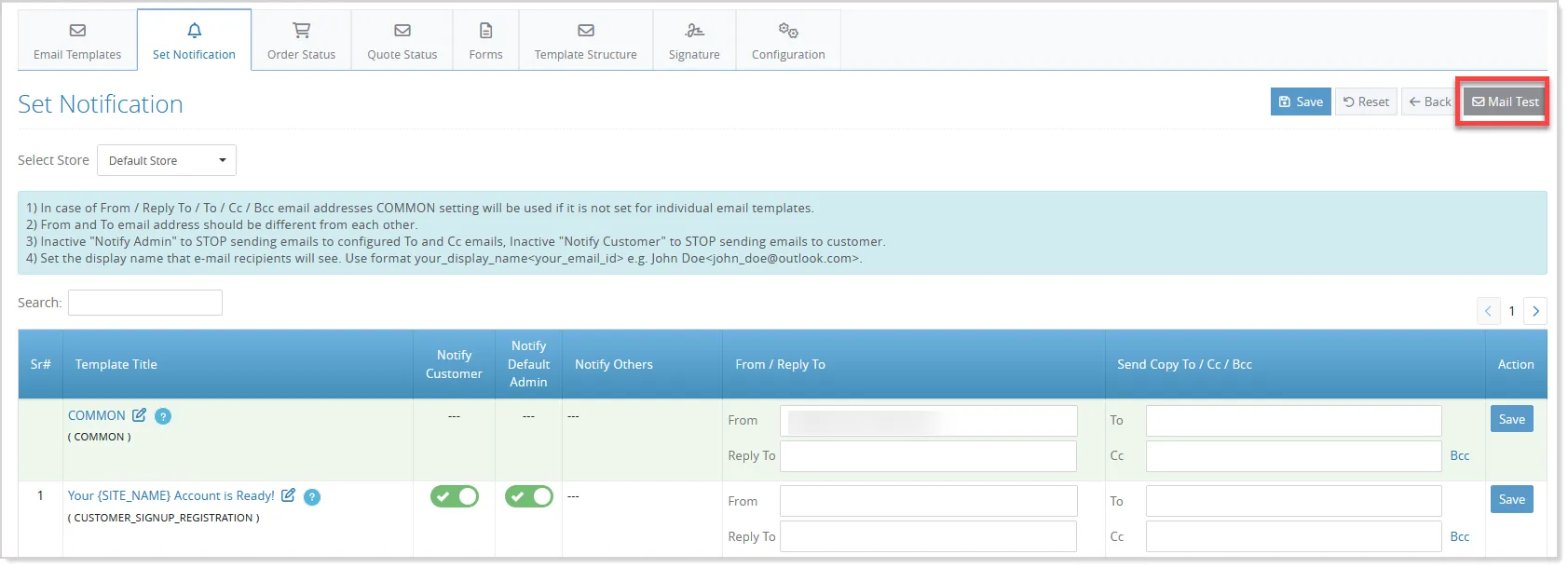
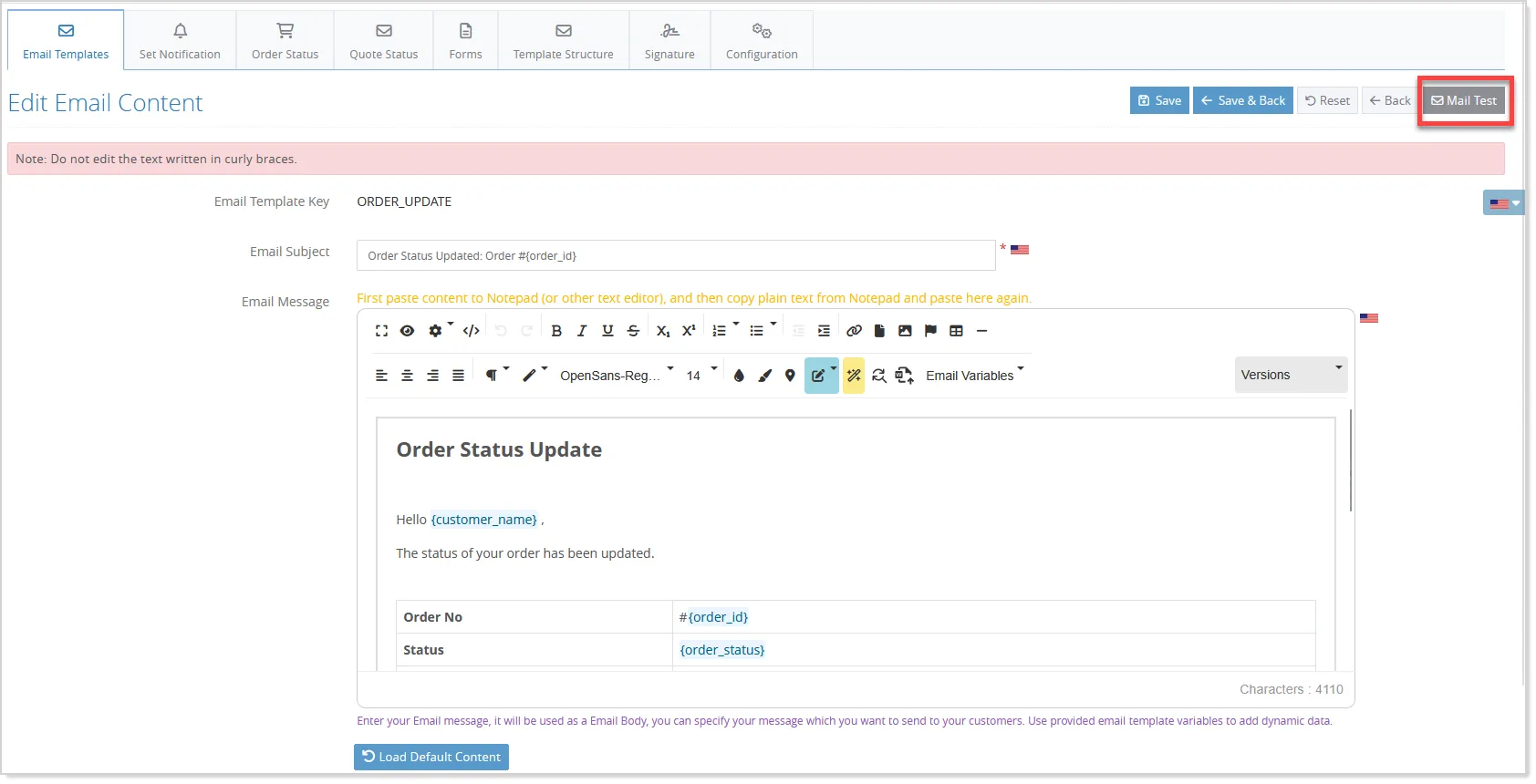
To this end, the existing Mail Test option under the Set Notification tab has been enhanced, and an individual Mail Test option is now available on each email Edit screen:
You can select any email template, enter sender and recipient details, and preview how the email will appear with sample values:
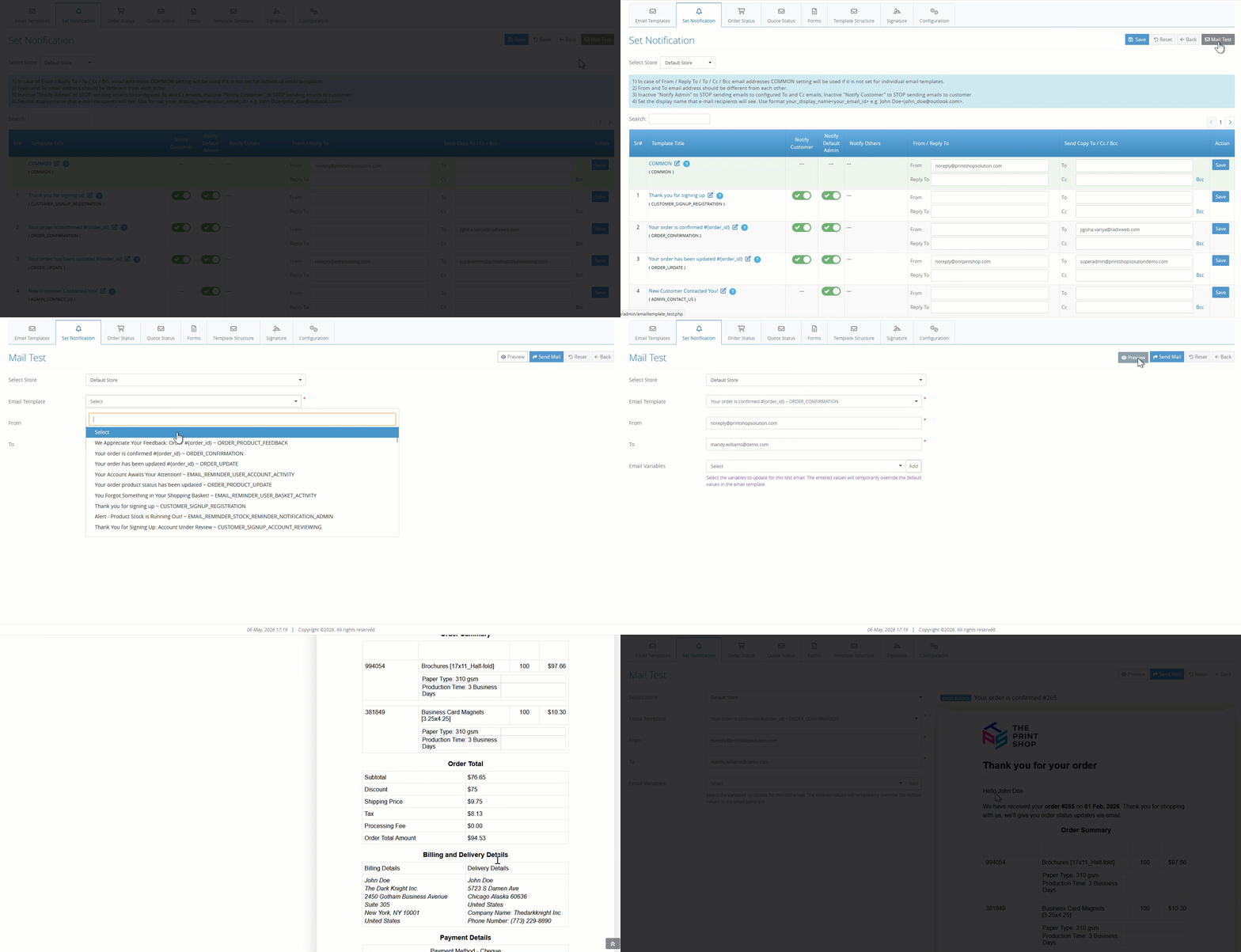
The system automatically detects all variables used in the template and allows you to modify their dummy values for accurate testing:
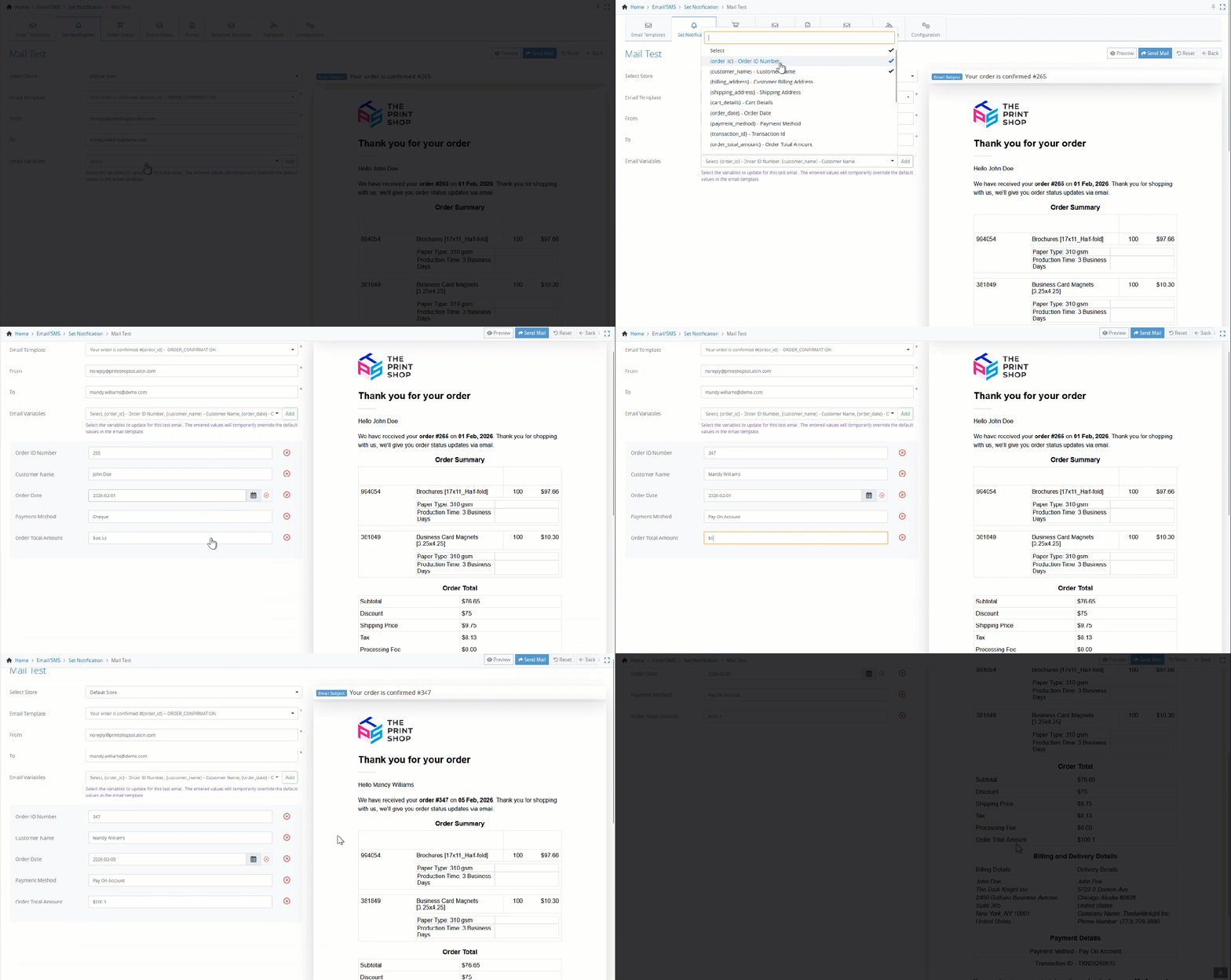
You can also preview emails directly from the template editor, where all variables are replaced with default or entered values.
Additionally, the system supports various scenarios, such as order status, quote status, and custom forms, ensuring the correct data is applied during testing.
This makes it easier to validate email content, ensure proper formatting, and confidently send emails without errors.
Secure Email Delivery with OAuth 2.0
To support modern email security standards, OAuth 2.0 authentication is now available for SMTP connections. This replaces basic authentication with a more secure, token-based approach.
Admins can configure OAuth 2.0 for Microsoft or Google directly from the email settings and verify it using the Mail Test option:
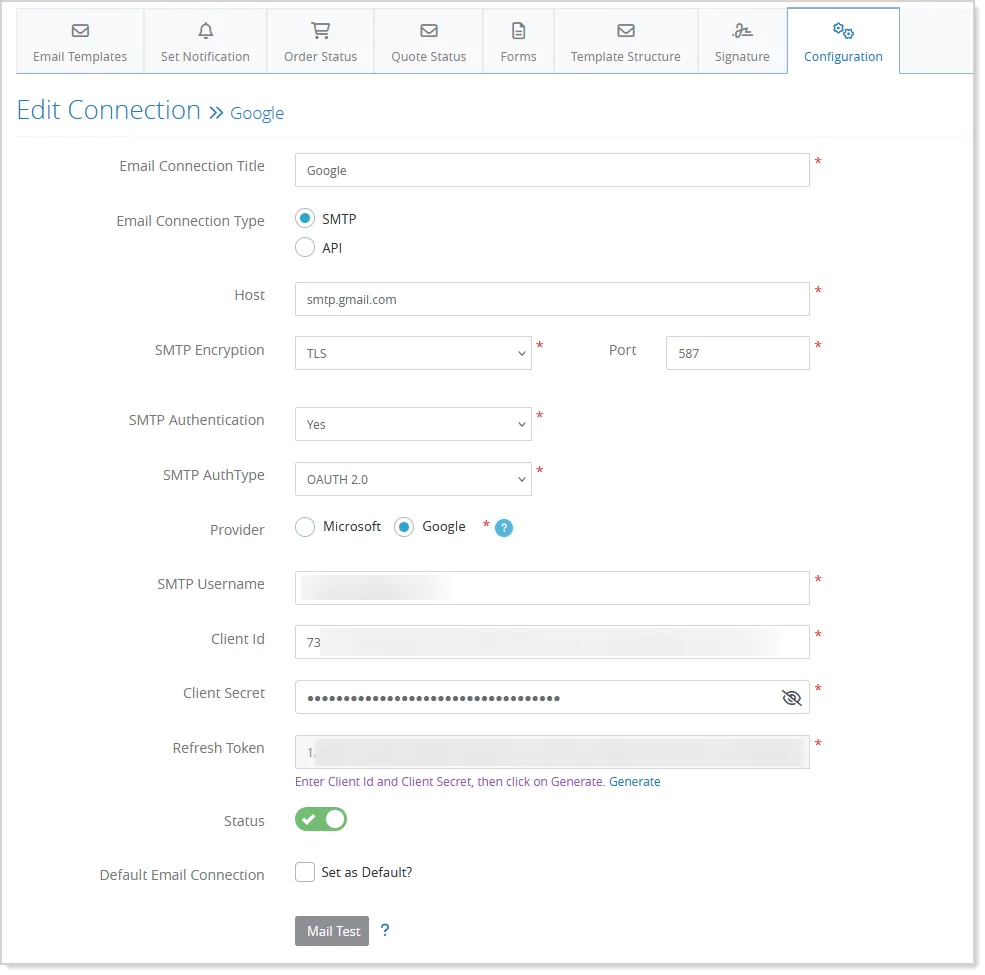
Once set up, emails continue to work as usual, with authentication handled automatically in the background, including token validation and refresh.
Secure Email Submissions with CAPTCHA Protection
Email forms like Newsletter Subscription and Share Product are commonly used by customers, but they can also be vulnerable to spam and automated bot activity. To improve security and ensure only genuine users interact with these features, CAPTCHA validation has now been introduced.
With this enhancement, CAPTCHA can be enabled on both the Newsletter Subscription and Share Product forms. This helps prevent automated submissions while keeping the experience smooth for real users.
Admins can easily configure CAPTCHA from the existing Captcha Manager by selecting their preferred service, such as Google reCaptcha or Cloudflare Captcha. The setup can be applied specifically to the front store or across both environments, depending on requirements.
Once enabled, users will be required to complete CAPTCHA verification before submitting their email.
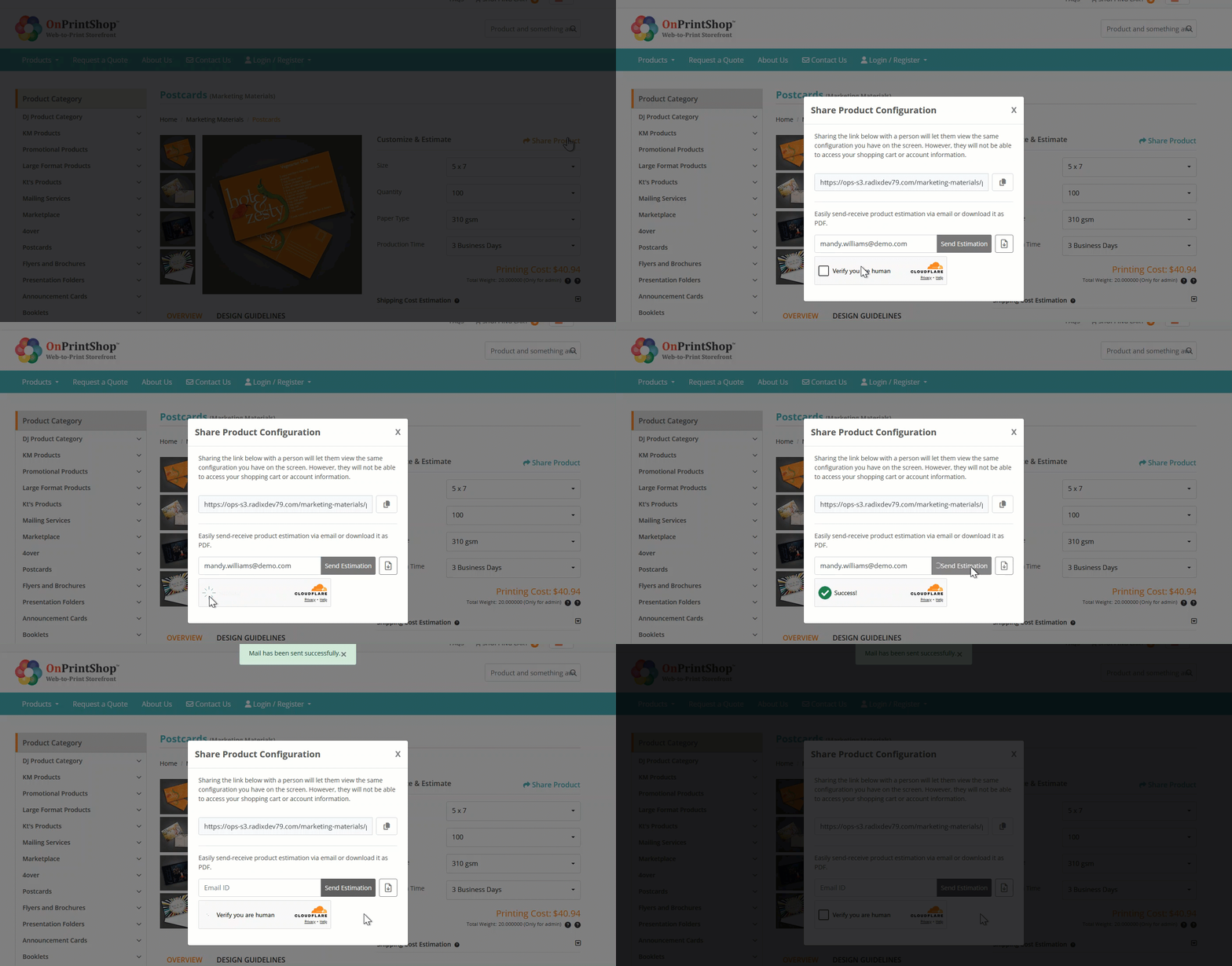
If the verification is successful, the action proceeds as expected. If not, a clear message is displayed, ensuring better control and protection against invalid submissions.
This enhancement strengthens platform security while maintaining a seamless user experience.
Faster Data Exports with Background Processing
Exporting large data files can sometimes take time and affect system performance. With this enhancement, exports now run in the background, allowing you to continue working without interruption.
When you start an export, the system processes it asynchronously and notifies you once the file is ready:
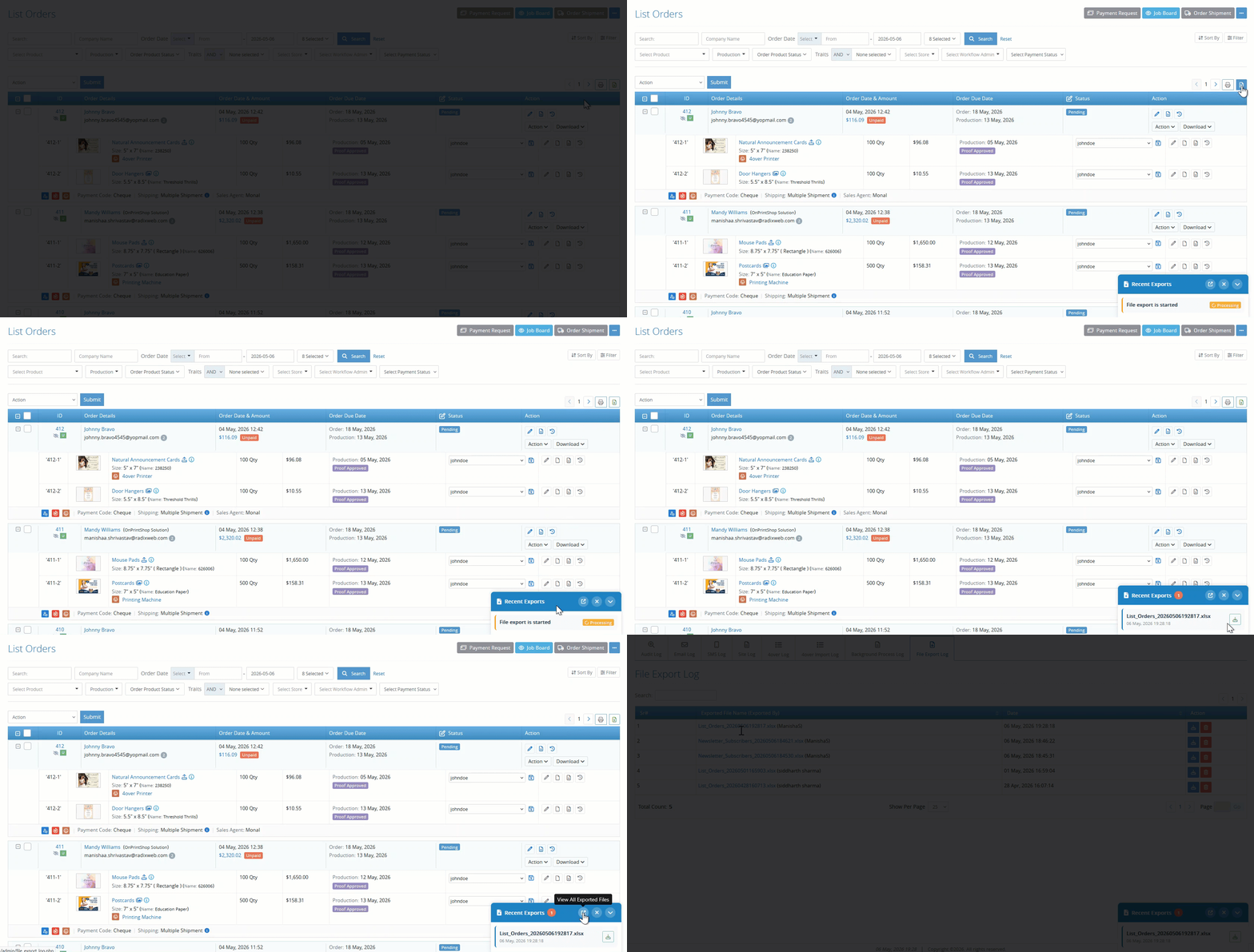
- A Recent Exports pop-up lets you track progress and download files easily.
- Completed files are removed from the pop-up after download, while all past exports can be accessed anytime from the File Export Log.
This improvement ensures faster, more reliable exports and a smoother admin experience.
Prevent Main Site URL Usage in Stores
Store URL validation has been enhanced to prevent store main URLs from matching the site’s primary domain URL. During store creation or modification, the system now validates the configured Main URL against the main site domain and restricts saving if both URLs share the same base domain.
This enhancement helps avoid routing conflicts, duplicate domain mapping issues, and storefront accessibility problems by ensuring each store is configured with a unique and valid domain structure.
CMS Preview Using SEO URLs
CMS page preview functionality has been improved to use SEO-friendly URLs instead of internal system URLs while previewing pages from the admin panel.
This enhancement allows administrators to preview CMS pages using the actual storefront URL structure, providing a more accurate representation of how the page will appear to end users.
By using SEO-friendly URLs during preview, administrators can also verify URL formatting and SEO behaviour before publishing the page, helping ensure a more consistent and optimized storefront experience.