Product Section
Generate Mask from Admin Panel
OnPrintShop now allows admins to generate mask images directly from the Admin Panel without creating and uploading mask files separately. With this enhancement, mask shapes can be defined directly in the system using configurable parameters, making mask creation faster and easier to manage.
From the existing Product Mask and Option Mask screens, admins can select Generate Mask as the Mask Source and choose from supported shapes such as Rounded Rectangle, Circle, Leaf, Single Round Corner, and One Rounded End, etc.:
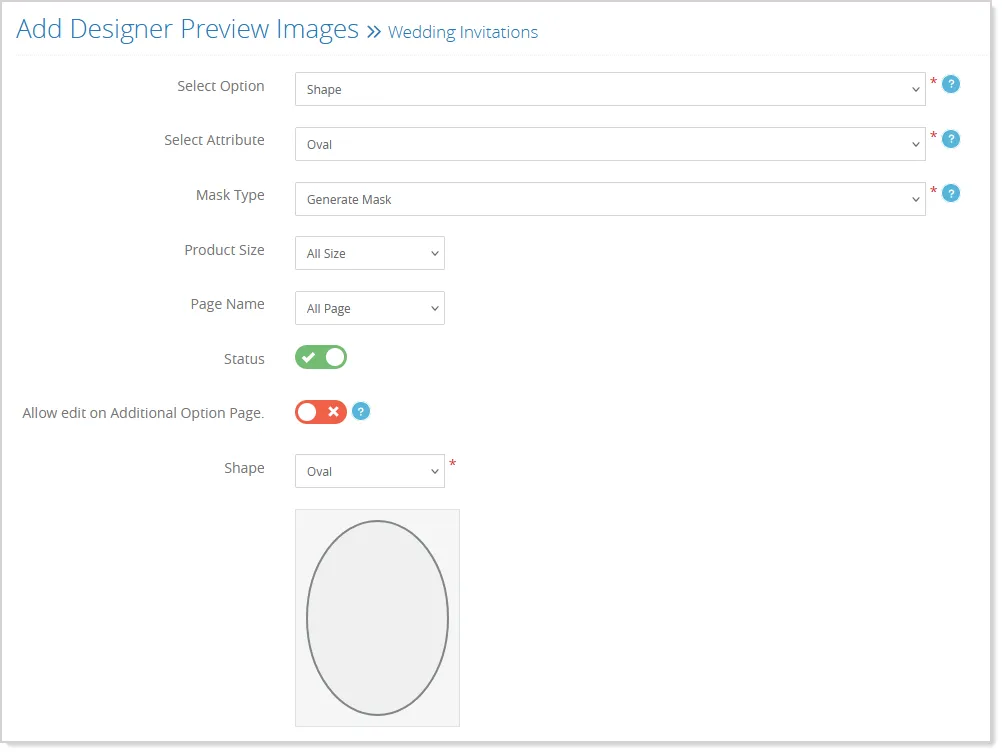
Depending on the selected shape, admins can define parameters such as radius and corner location, while required dimensions are calculated automatically. Additionally, admins can generate a custom shape mask by selecting "Custom" as the Shape and providing an SVG path to define the shape.
For Option Masks, the generated mask can also be configured for specific or all product sizes and pages, providing flexibility when the same mask needs to be applied across multiple configurations.
Once the configuration is saved, the system generates a visual mask preview and stores the mask definition for use in Studio and Dynamic Help Templates:
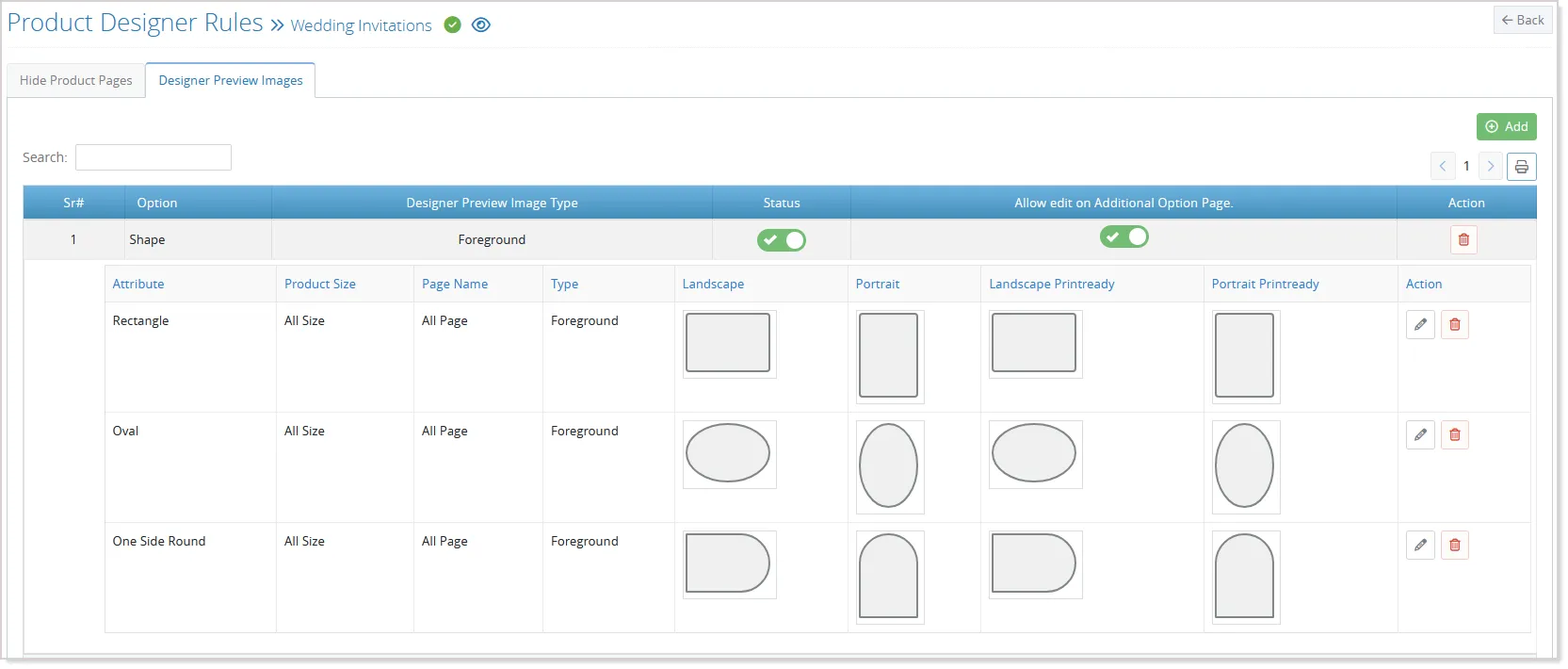
The existing Upload Mask Image option continues to be available, allowing admins to either generate a mask within the Admin Panel or use a previously created mask image.
Support Standard and Die-Cut Shapes in a Single Product
Administrators can now configure Standard shapes such as Circle, Heart, and Rectangle along with Die-Cut personalization within a single product. This removes the need to maintain separate products for standard-shaped and custom die-cut designs, making product configuration and management more flexible.
Product Configuration
To configure this, go to Products Print Products, add or edit a Die-Cut Personalization product, and configure the required product settings.
- Die-Cut products can now use options such as Browse Design and Price Defining Method while adding or editing.
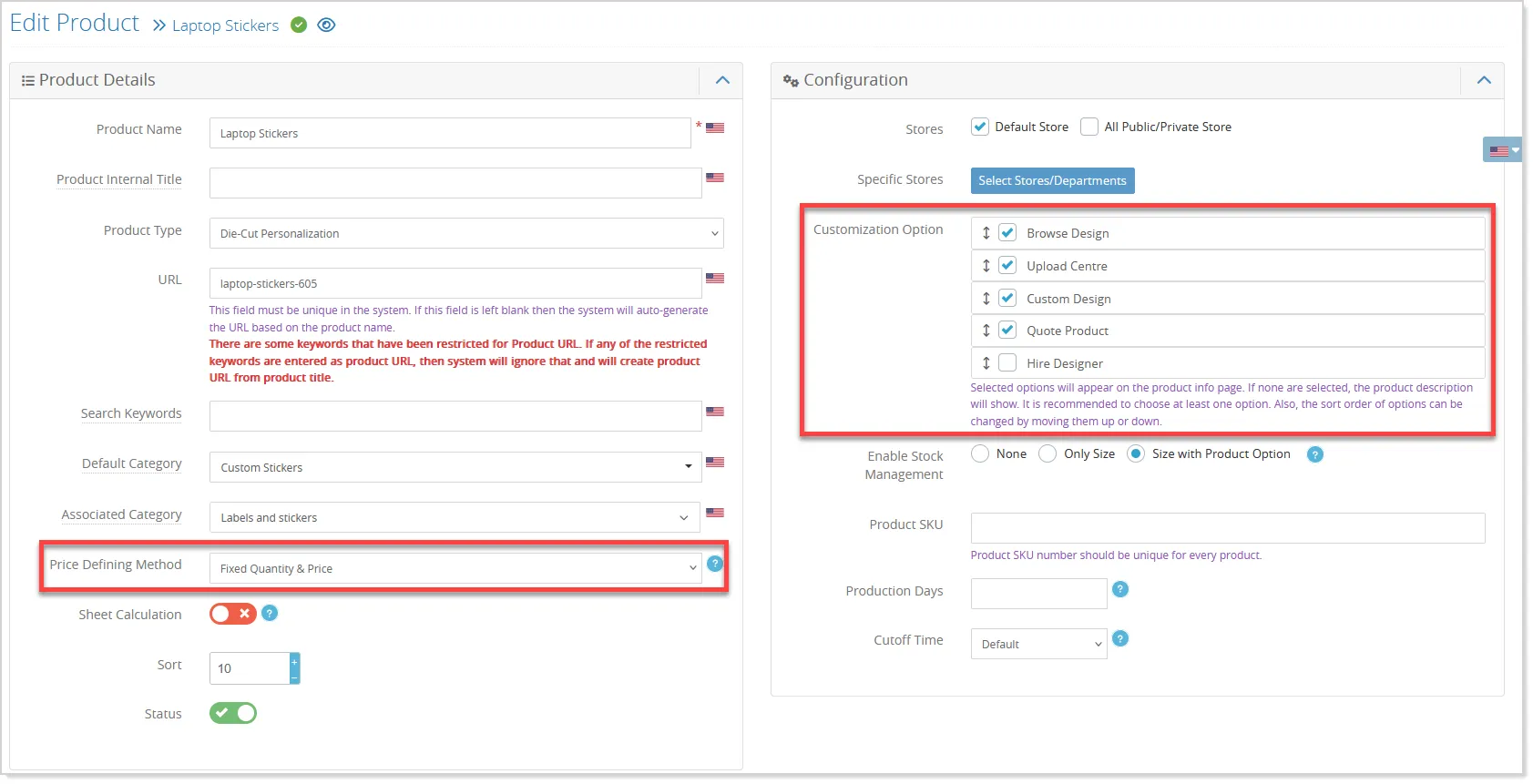
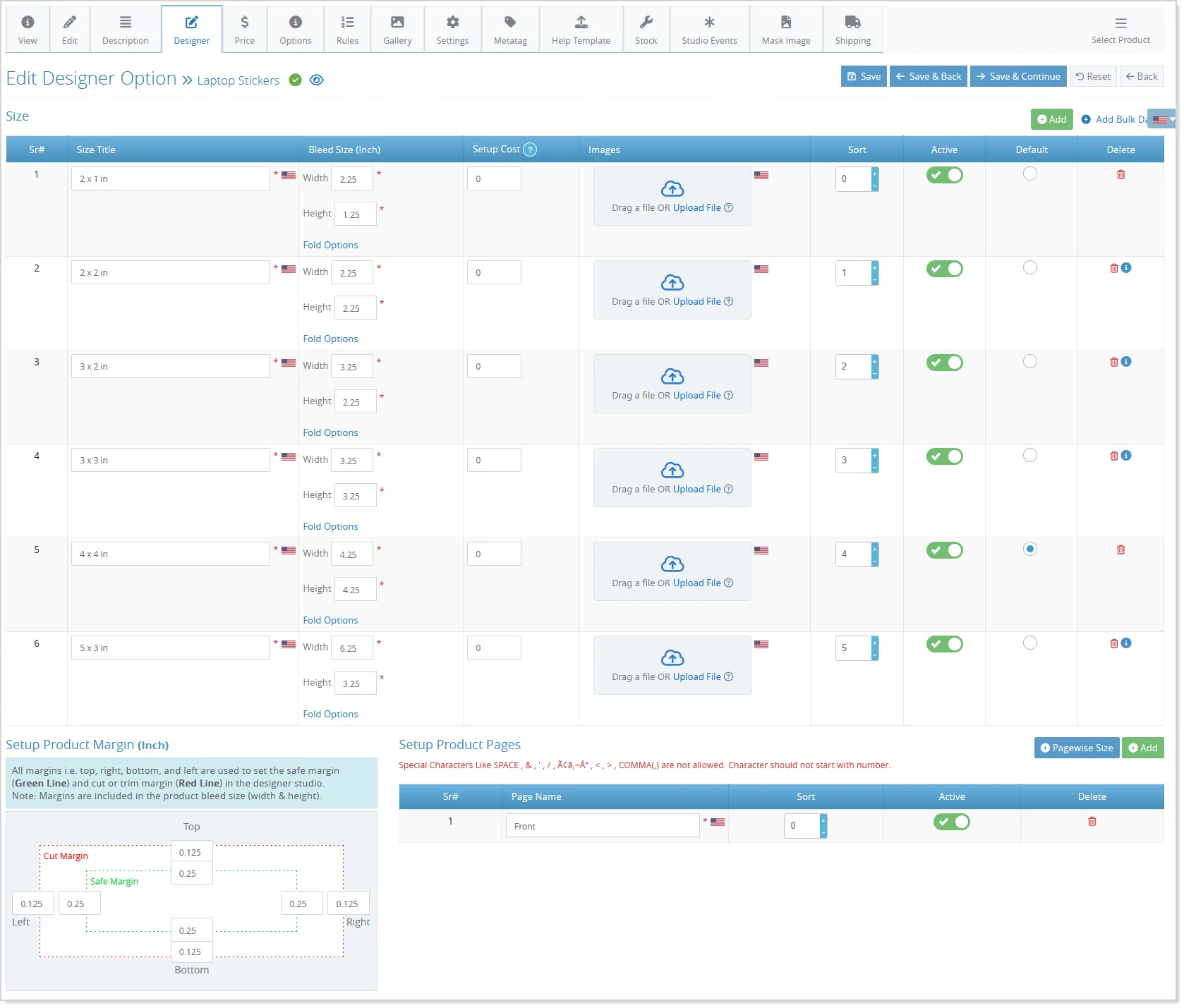
- The Designer tab is now available to configure Product Sizes, Product Pages, Cut Margins, Safe Margins, and Design Rules. This brings the configuration capabilities of standard products to Die-Cut products as well:
Shapes and Masks
- The Shape option allows administrators to define the shapes available to customers, such as Circle, Heart, Rectangle, and Die-Cut:
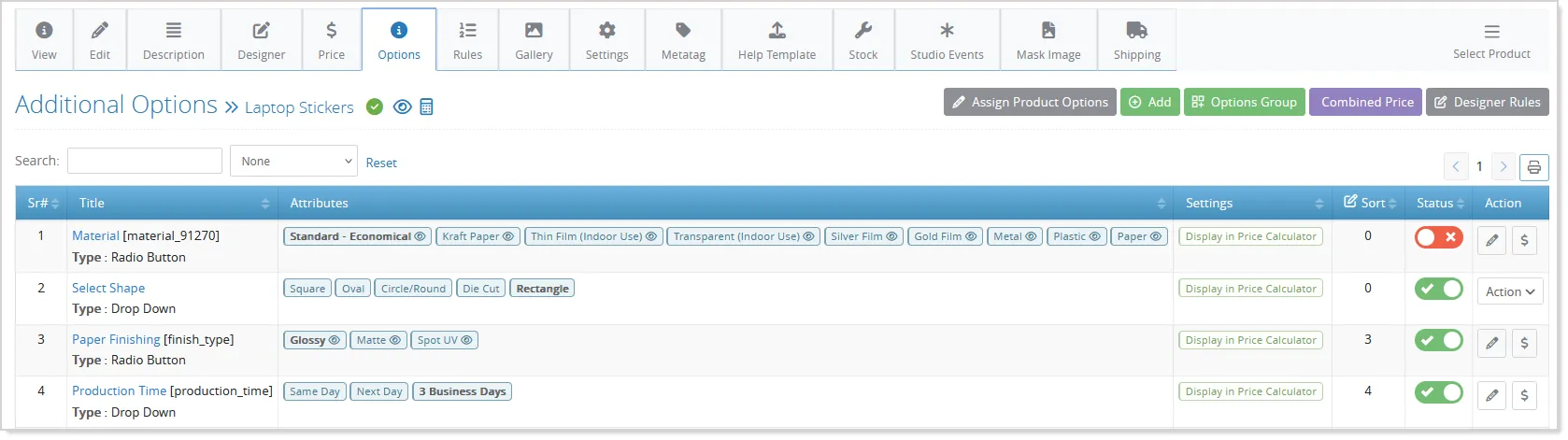
- Standard shapes can be mapped to their corresponding mask images, while selecting Die-Cut enables the existing custom Die-Cut behavior, including image upload and automatic contour generation:
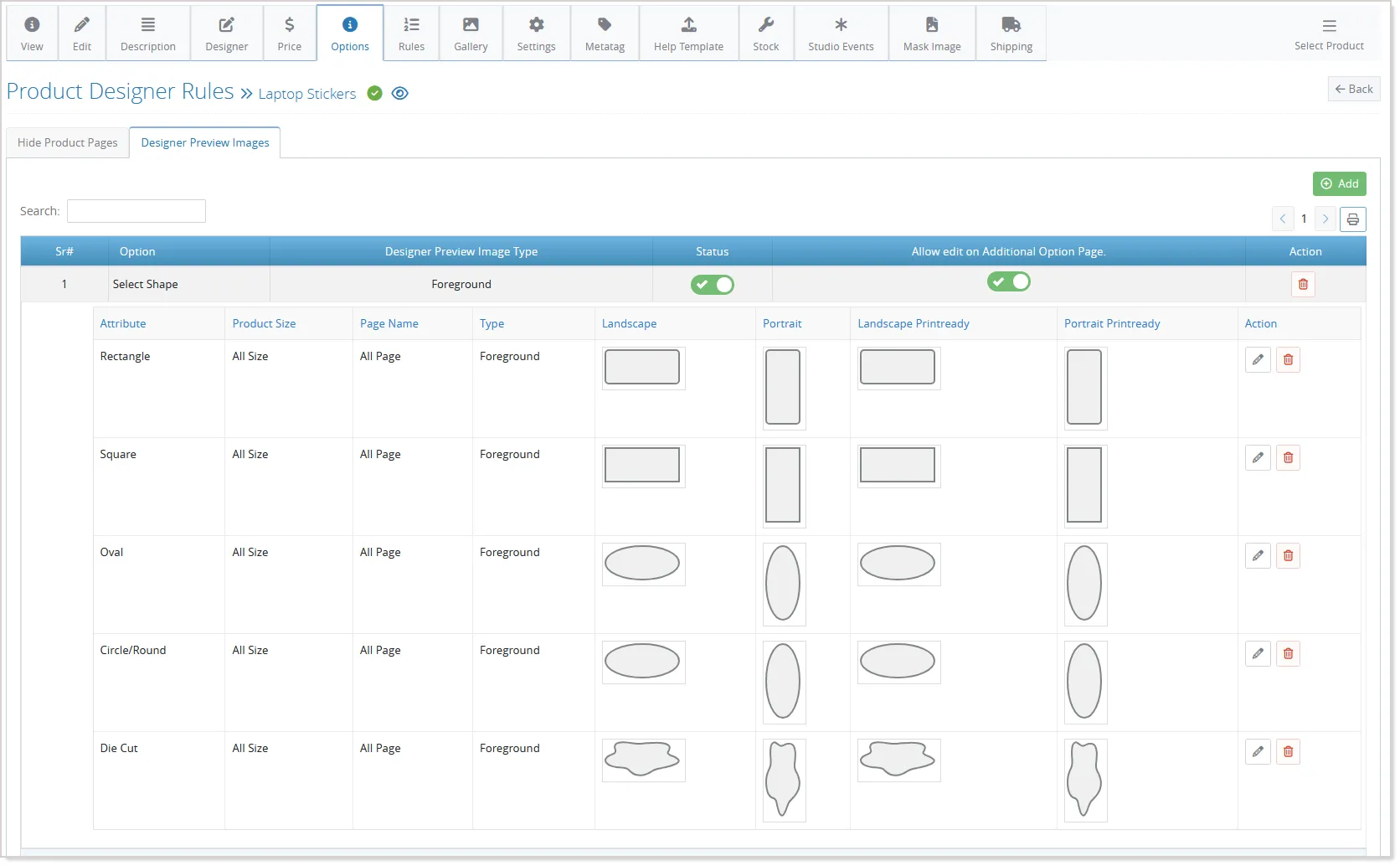
- This allows different personalization methods to be offered under the same product.
Product Templates
- Administrators can also use the existing Product Templates functionality to create templates for the supported shapes:
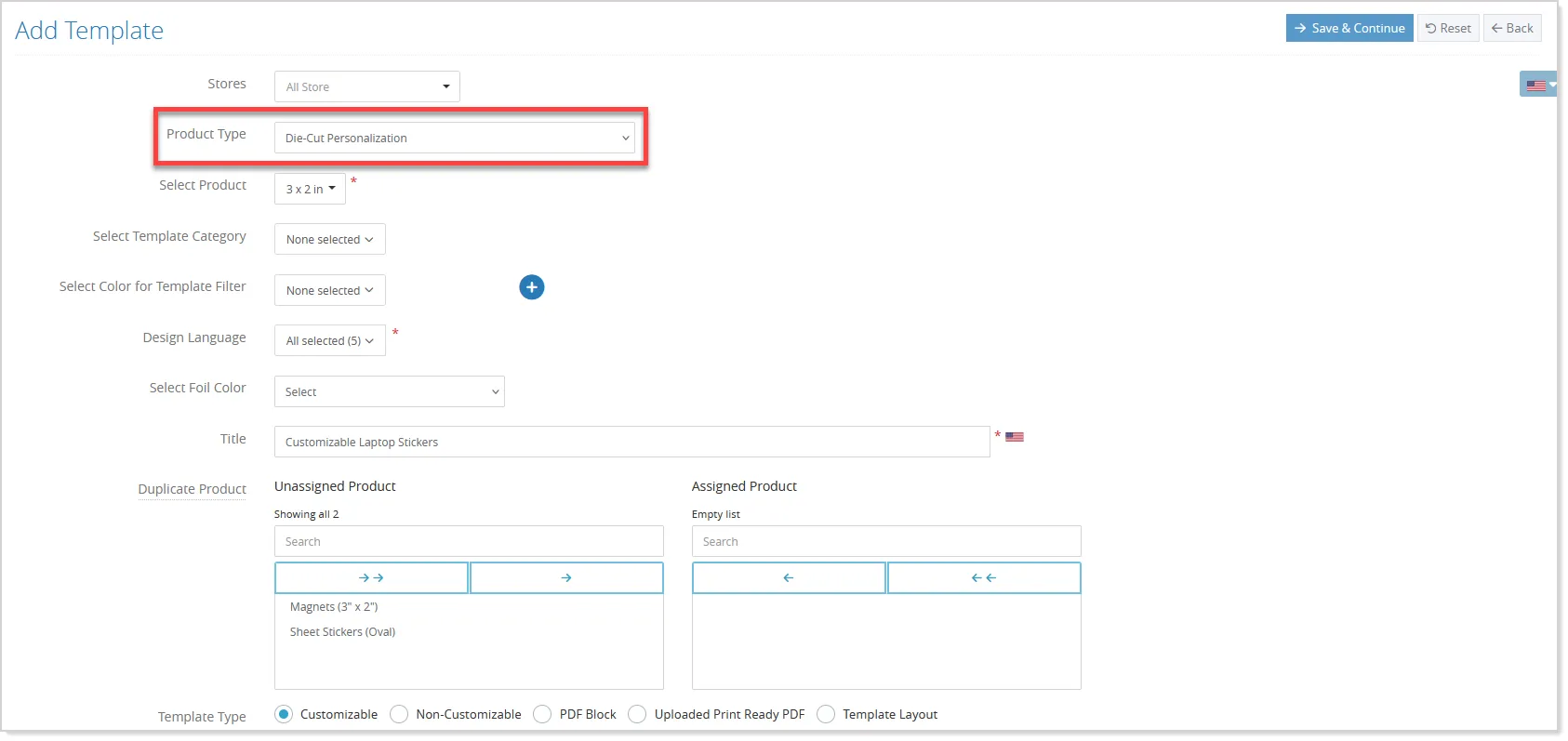
- While creating or editing a template in Designer Studio, the applicable shape can be selected from the Additional Options:
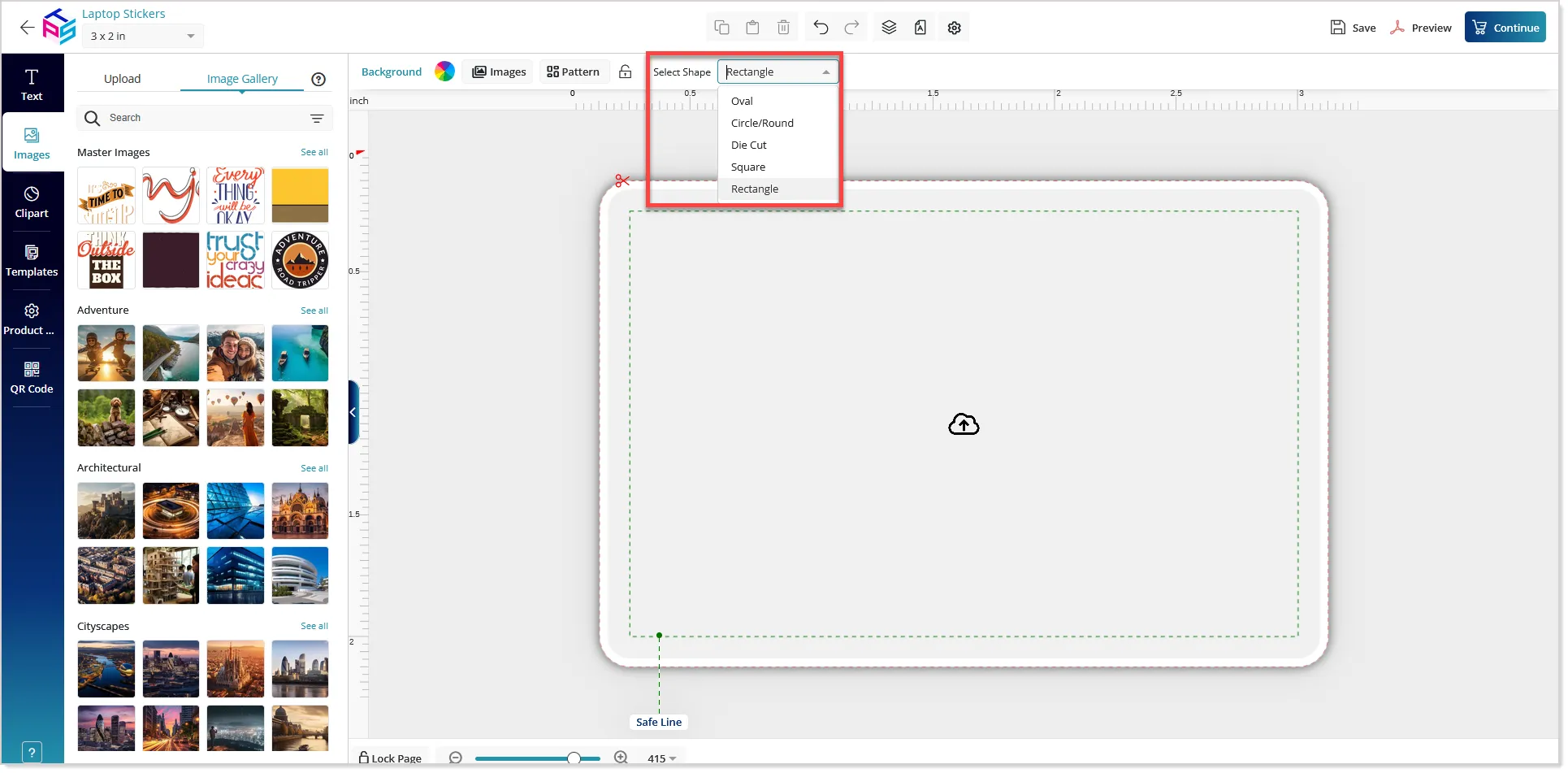
- The corresponding mask is loaded in the studio based on the selected shape, allowing administrators to create separate templates for different shapes. If the shape is changed while editing a template, the mask preview is updated accordingly.
For Adaptive Size Templates, the shape is determined by the product's configured size and option attributes.
Storefront Flow
- On the storefront, customers can select their preferred shape and continue with the applicable design flow.
- For products configured with Design Rules and Quick Design, customers can switch between available shapes and see the corresponding templates and masks.
- Selecting a standard shape opens the design with that shape's mask, while selecting Die-Cut continues to use the custom Die-Cut workflow.
- Products without Design Rules continue to follow the existing Die-Cut Quick Design behavior, ensuring backward compatibility with existing products.
- For products where Quick Design is disabled, customers follow the standard flow of price calculation, Browse Design, template selection, and Designer Studio. The selected shape is retained when the template is opened, and the corresponding mask is applied in the studio.
The enhancement also maintains compatibility with saved designs, portfolio designs, and cart editing. The selected shape is stored with the design configuration, so when a customer reopens a saved design or edits an item from the cart, the correct template, shape, and mask are restored. Existing Die-Cut designs continue to open using their original Die-Cut workflow without requiring any changes.
Configure Product Gallery Images by Size and Option Combination
With v13.1, administrators can configure product gallery images according to the customer's selected Size + Option combination. This provides greater flexibility in presenting product visuals for different configurations and allows customers to see images that are more closely aligned with the product selections they make on the storefront.
To configure this, go to Product Product Gallery and open Product Image Gallery Settings:
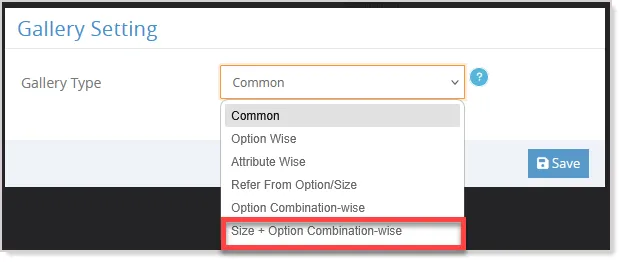
- Enable Size + Option Combination Wise Image Upload to allow gallery media to be mapped according to product size and options. This setting is available for supported products where sizes and options are configured.
After enabling the setting, go to Product Product Gallery Add Product Gallery Image to upload the required images or videos:
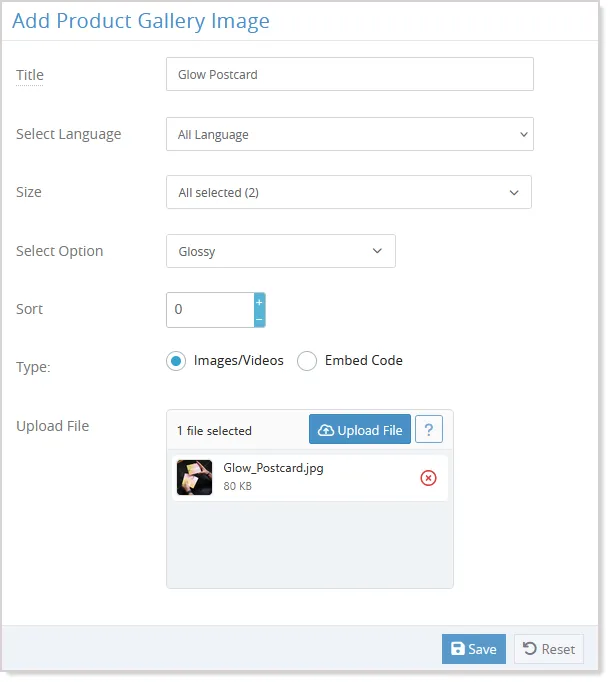
Administrators can select the applicable sizes and options for each gallery item. The media can be configured as a common image for all combinations, mapped to specific sizes or options, or assigned to an exact Size + Option combination.
The configured mappings can be reviewed from Product Product Gallery Product Gallery Images:
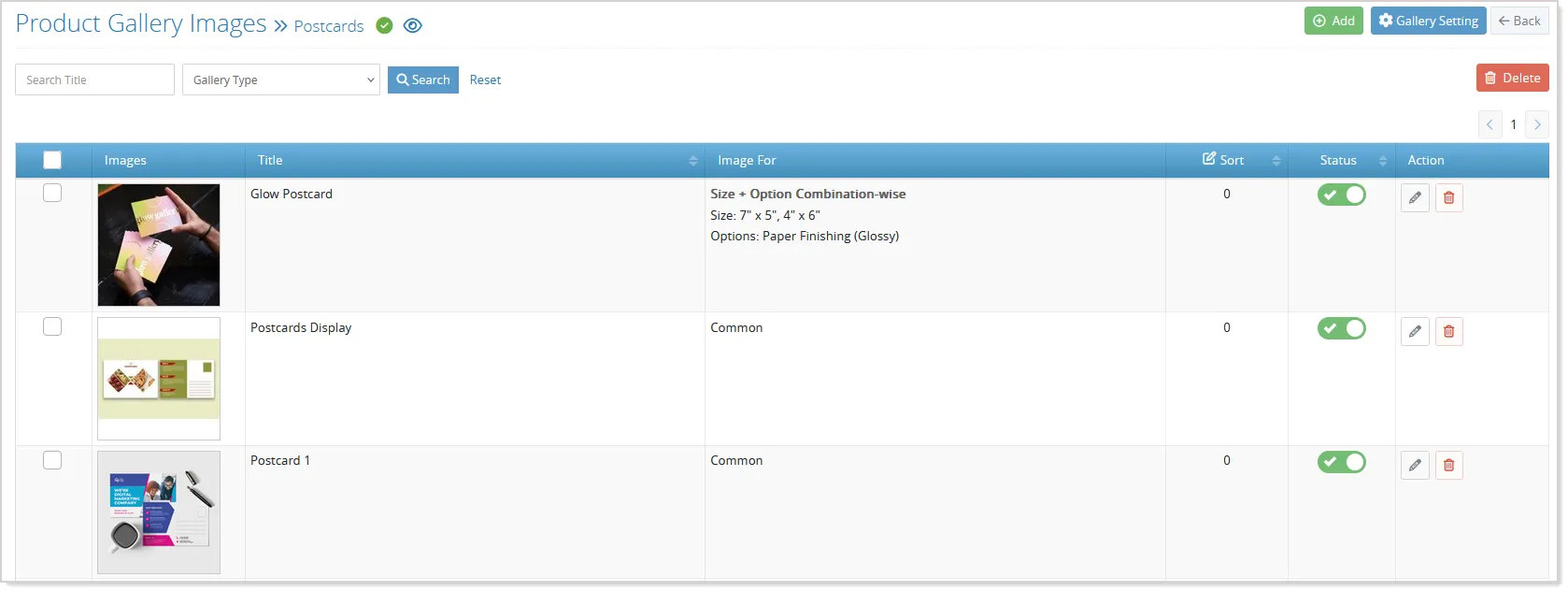
- The Image For column displays the size and option details associated with each gallery image, and administrators can use the Size + Option Combination-wise filter to view the relevant gallery entries.
On the storefront, the gallery automatically evaluates the customer's selected size and options and displays the most relevant matching media. An image configured for an exact Size + Option combination receives priority over an image configured only for a size, an option, or all combinations. This allows a specific product configuration to have its own visual representation while still supporting broader gallery images where a specific mapping is not available.
The Gallery Filter by Selection setting further controls how the matching gallery media is presented. Depending on the configured behavior, customers can either see only the images applicable to their current selection or continue to see all configured gallery images, with the image matching their selection highlighted as the primary image.
For example, if a product offers three sizes, multiple colors, and different finishing options, administrators can configure general product images along with images for specific combinations. When a customer selects a particular size, color, and finish, the system identifies the most specific matching image and displays it accordingly. If an exact combination is not configured, the applicable broader image mapping can be used instead.
The enhancement also continues to support the existing product gallery workflows, including gallery image management, product duplication, supported storefront gallery configurations, and applicable kit product scenarios. When a configured size or option is deleted or made inactive, the corresponding gallery mapping is updated so that the invalid combination is no longer used for the storefront display.
Manage Product Configuration Files by Language
With v13.1, administrators can manage separate images and files for different languages across key product configuration areas. This enhancement allows Product Size images, Additional Option Attribute images, Master Option Attribute images, and Product Help Template files to be maintained according to the language in which they are used, providing a more localized experience for multilingual storefronts.
Product Size Images
To manage language-specific Product Size images, go to the Designer tab for standard products and the Custom Size tab from the Product Settings for custom size products:
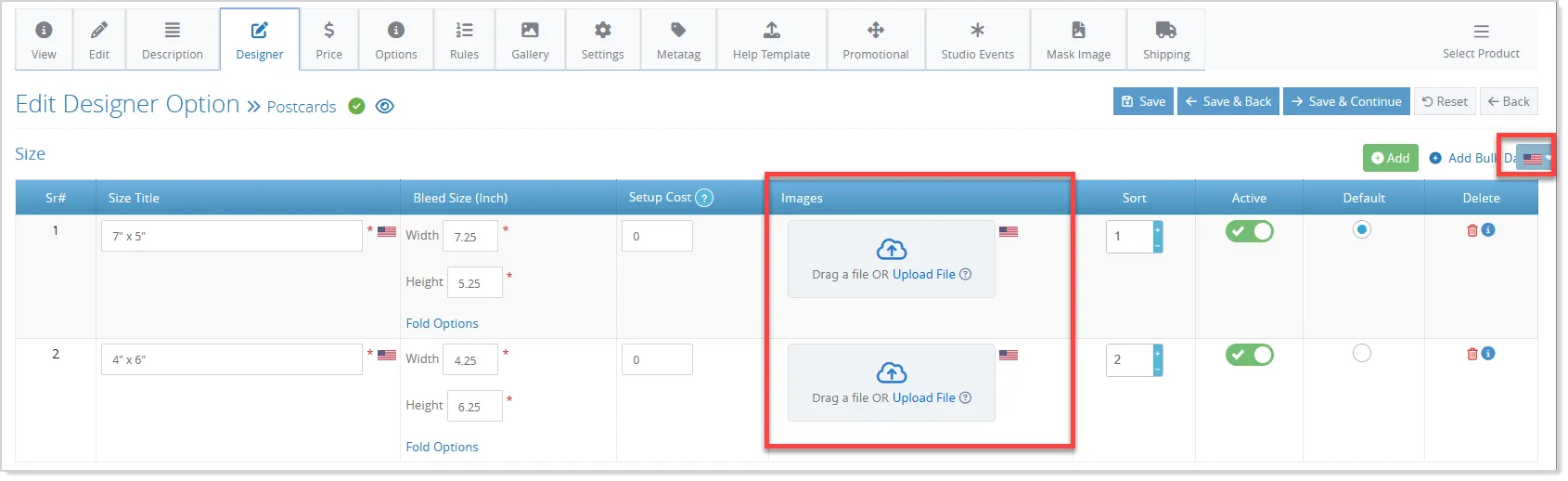
The image upload controls are available for each configured language, allowing administrators to upload and manage the appropriate image for each language independently.
Option Attribute Images
Administrators can similarly manage language-specific images for Master Option Attributes and Additional Option Attributes.
- From the relevant Master Option or Additional Option configuration screen, select the required language and upload the corresponding attribute image:
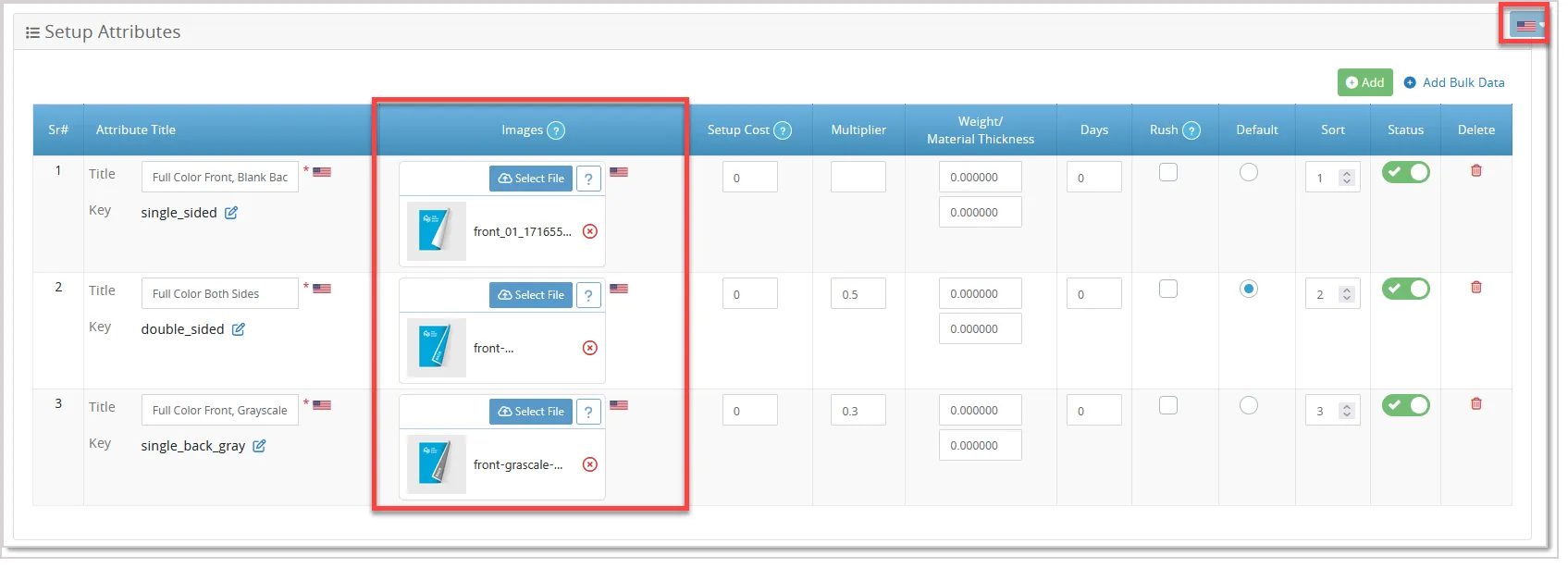
- Each language maintains its own image, allowing localized visuals to be provided for different storefront languages.
Product Help Templates Files
For product documentation, language-specific Help Template files can be managed from the Product Help Template:
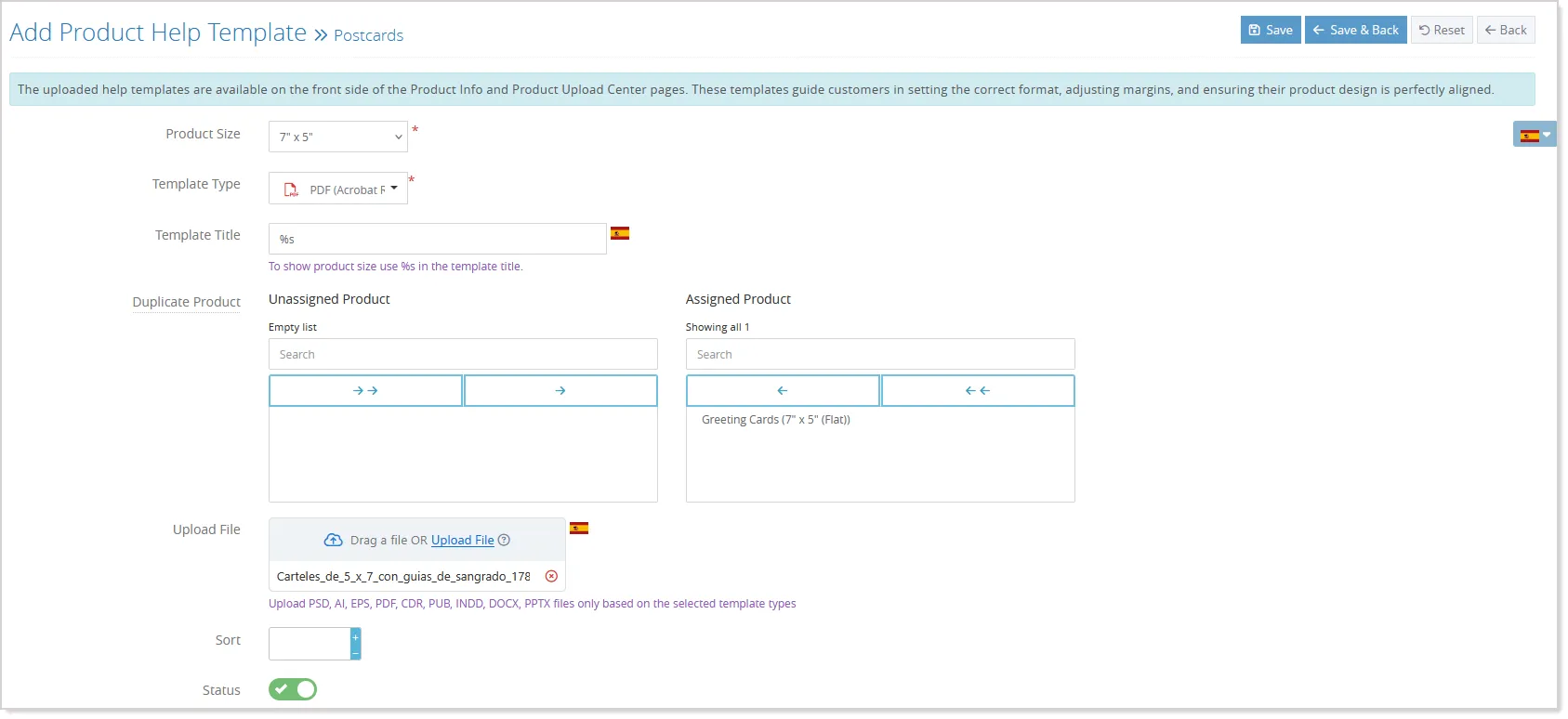
- Select the required language and upload the corresponding file.
- Each language can have its own Help Template while the existing file formats and product size mapping continue to apply.
When a default-language image or file is uploaded for the first time, the system copies its reference to the available language rows. Administrators can replace these references with language-specific files as required. Once a language-specific file is uploaded manually, it remains independent when the default-language file is updated.
On the storefront, the system displays the applicable language-specific images based on the current site language. These images are supported in the Visual Price Calculator, Product Gallery, and Product Filters. Help Template files are similarly displayed according to the selected language on the Product Information and Product Upload Center pages.
The language-specific files are also retained when products, Master Options, or Additional Options are duplicated. The existing Web Optimization process supports these localized images as well.
This enhancement provides administrators with a consistent way to manage localized product visuals and supporting files, helping multilingual storefronts present content appropriate to the customer's selected language.
Predefined Custom Size Rules
Product Rules for Custom Size products are now enhanced to support predefined custom sizes, giving admins more control over which sizes customers can select and when specific product rules should apply.
With this enhancement, admins can use the new Additional Option Based Size Hide rule from the Products Product Rules to hide specific predefined sizes based on selected additional option attributes:
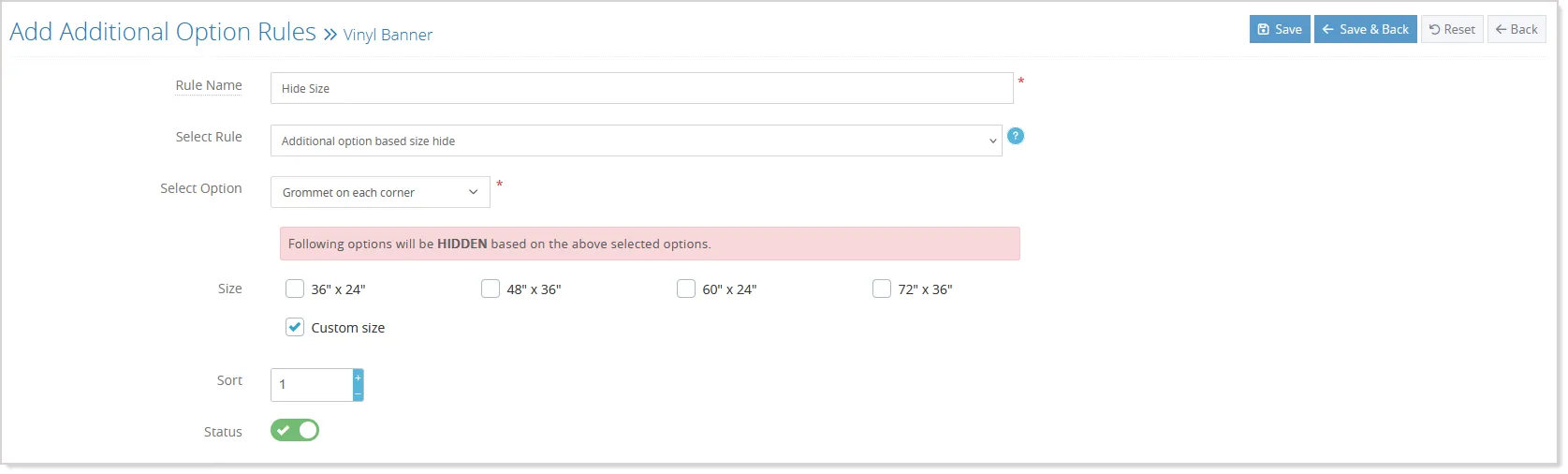
They can also choose to hide the Custom/Dynamic Size option, preventing customers from entering their own dimensions when a particular combination of options is selected. The available sizes are restored automatically when the rule conditions no longer apply.
The existing size-based rule types are also enhanced with a Size parameter, allowing admins to select one or more predefined custom sizes as conditions instead of using dimension-based comparisons. This enables rules such as applying a quantity restriction, hiding an option, or triggering other applicable rule behavior only when a specific predefined size is selected.
Minor Enhancements
Hire Designer, Help Template & Upload Artwork Later for More Product Types
The Hire Designer, Help Template, and Upload Artwork Later options are now extended to Quick Design, Pattern, Document Print, Die Cut, and Canvas products, providing a more consistent ordering experience across product types.
Admins can enable these options from the respective product settings. Hire Designer lets customers request professional design assistance by providing a design brief, reference files, and instructions. Depending on the product type, the designer options appear in the Price Calculator or Personalize section, with the configured designer cost automatically added to the product price. For Pattern, Quick Design, and Die Cut products, selecting Hire Designer replaces the regular personalization interface with the designer options.
Help Template allows admins to provide design reference files and position the Help Template section within the product page layout. Customers can use these templates to understand dimensions, bleed, safe areas, and other design requirements.
Upload Artwork Later lets customers proceed with an order without uploading artwork during customization. They can provide the artwork later through Order History or the Upload Center, while the existing upload workflow remains available for customers who want to upload files immediately.
For Document Print products, the enhancement also includes the ability to delete uploaded files and store uploaded document information product-wise, providing greater flexibility in managing artwork.
SKU Generation for Textbox-Price with Multiplication
You can now assign SKUs to Textbox-Price with Multiplication options directly from the SKU panel, along with existing combo and radio options.
This makes it easier to manage SKUs for products that use Multiple Quantity Input and identify the SKU for each individual quantity entry.
In the SKU panel, select the Textbox-Price with Multiplication option and enter the required SKU. You can select it on its own or together with combo and radio options. The system generates the required combinations for each product size:
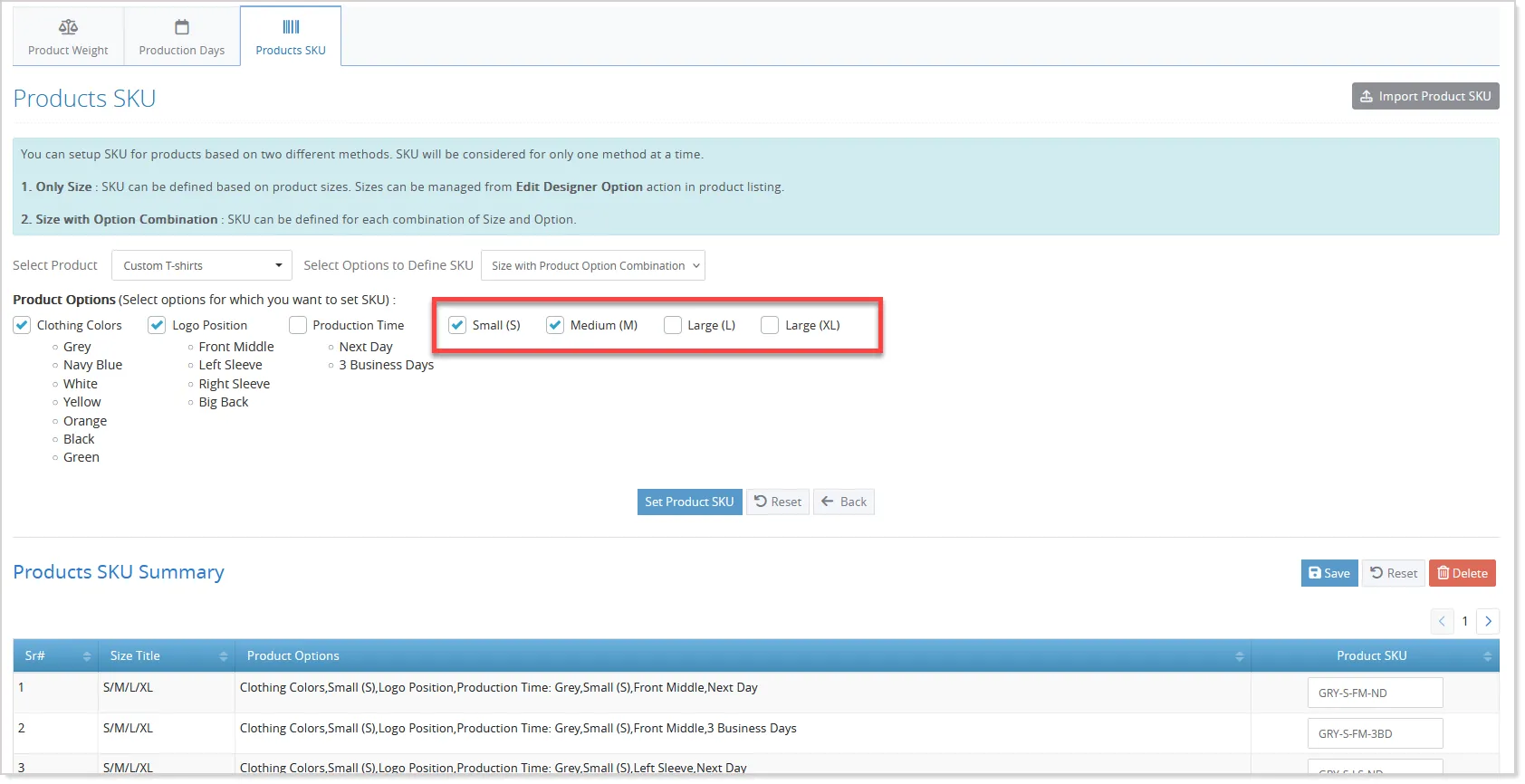
When Multiple Quantity Input is enabled, the resolved SKU is displayed below each quantity input on the frontend. The individual SKUs are also stored with the cart and order as comma-separated values.
The feature also supports SKU import/export, offline orders, and quotes. When a quote is converted to an order, the saved SKU information is retained for the existing stock management process.
SKU visibility continues to follow the existing SKU Display Site Variable settings.
Size Visibility for Multiple Quantity Input Products
The Size Visibility for Multiple Quantity Input Products enhancement gives admins greater control over the information displayed for Print Products that use Multiple Quantity Input.
A new “Yes with size hide” option is added to the Multiple Quantity Input setting for Print Products:
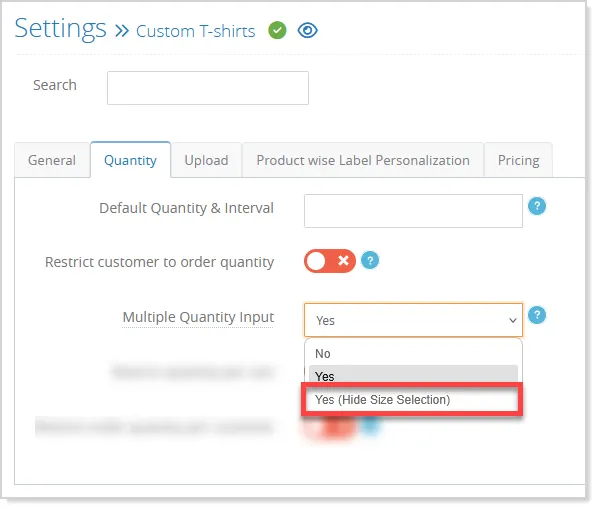
- When selected, Multiple Quantity Input remains enabled while the size information is automatically hidden. Admins can continue using the existing “No” and “Yes” options when size information should be displayed.
When size visibility is disabled, the size is consistently hidden across the product ordering flow, including Product Info, Additional Options, Browse Design, Design Studio, Upload Artwork, Cart, and Checkout:
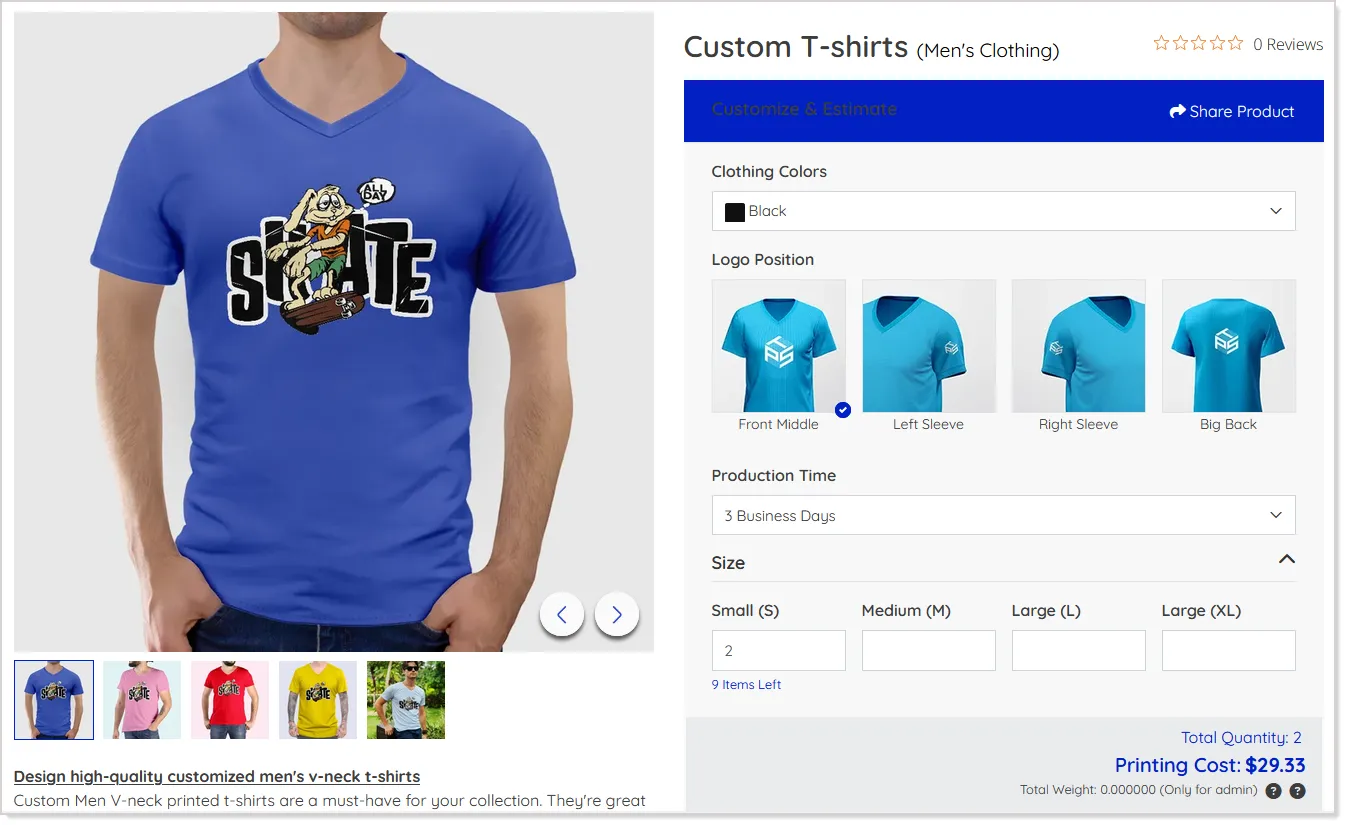
The same behavior is carried through quotes, offline orders, reorders, product listings, estimation PDFs/emails, and post-order pages, providing a consistent customer and admin experience. The internal size reference is still retained where required for system processing, while the displayed size value remains blank.
For Ready-To-Buy Products, the existing Multiple Quantity Input and size visibility behavior remains unchanged.
Single-Dimension Input for Shape-Based Products
Admins can now simplify size entry for shape-based products by automatically applying single-dimension input when a Circle or Square shape is configured through the existing mask/shape binding. When applicable, customers need only enter the width, and the system automatically uses the same value for the height:
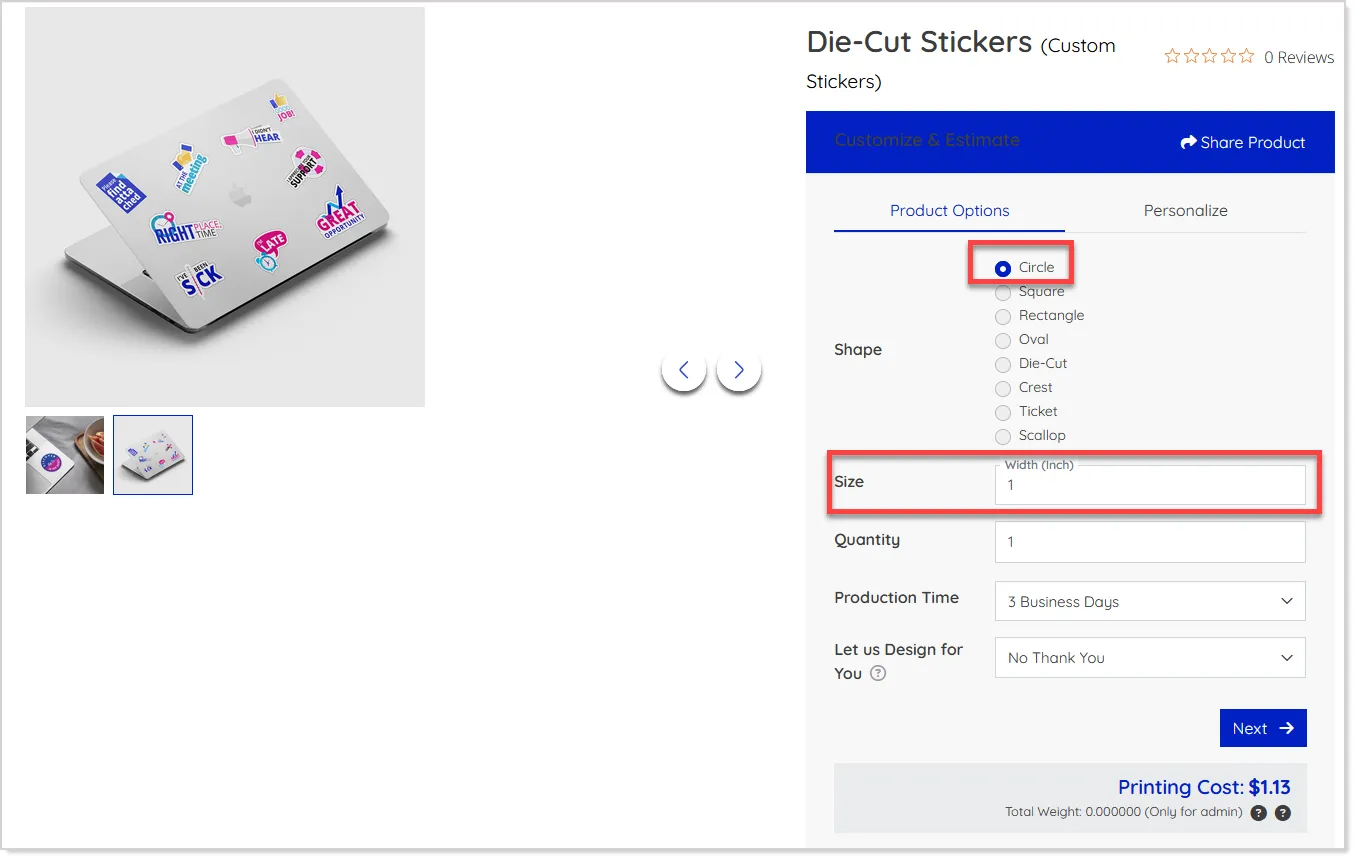
The enhancement works without any additional admin configuration and applies across supported storefront and admin price-calculation flows, including Product Info, Upload Center, Request Quote, Quick Calculator, Cart, and order-related price calculators. For other shapes, such as Rectangle or Leaf, both width and height continue to be available as usual.
The mirrored dimensions are carried through the cart and order flow normally, ensuring no impact on downstream processing.
Impose Oversized Products Across Multiple Sheets
The sheet requirements can now be accurately calculated when a product is larger than the available sheet size.
Instead of treating an oversized product as one job per sheet, the system determines how many sheets are required to cover the complete product and uses this calculation to derive the {no_of_sheet} value for pricing.
The calculation considers both normal and rotated orientations and automatically uses the more efficient option. Wastage is also calculated based on the unused area across the sheets required to produce the complete product. For products that fit within the sheet, the existing sheet and pricing calculations remain unchanged.
Product Duplication – Standard Shipping Pricing Copy
Product Duplication now allows admins to selectively copy Standard Shipping (Quantity Based) pricing when duplicating a product. When Price is selected, the option to copy Standard Shipping pricing is displayed if the source product uses this shipping method:
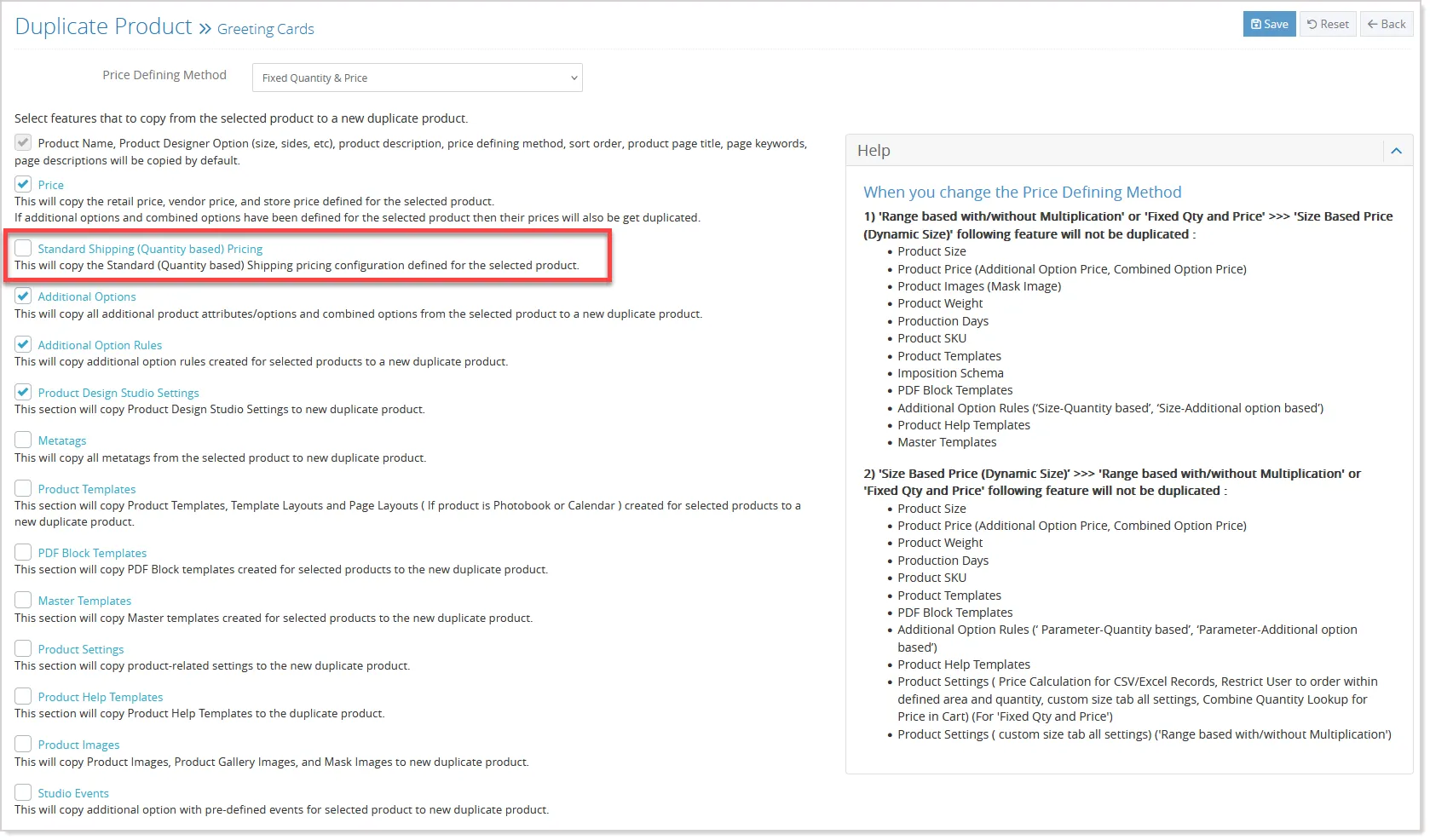
When selected, the shipping pricing, including store-wise and shipping zone-wise configurations, is copied to the new product. If not selected, only the product pricing configuration is duplicated, giving admins greater control over the pricing setup.