Product Section
Smarter Pricing for Custom-Size Products with Multiple Imposition Schemes
The Multiple Imposition Schema enhancement for custom-sized products helps improve sheet utilization and pricing accuracy by allowing the system to evaluate multiple sheet options instead of relying on a single imposition schema. This ensures the most efficient sheet is automatically selected based on the ordered product size, helping reduce material wastage and optimize production cost.
To configure this feature, first ensure that Sheet Sizes and their corresponding Imposition Schemas are already created in the system. Product options such as Paper Type or GSM should also be configured, as these are used for sheet mapping and pricing calculations.
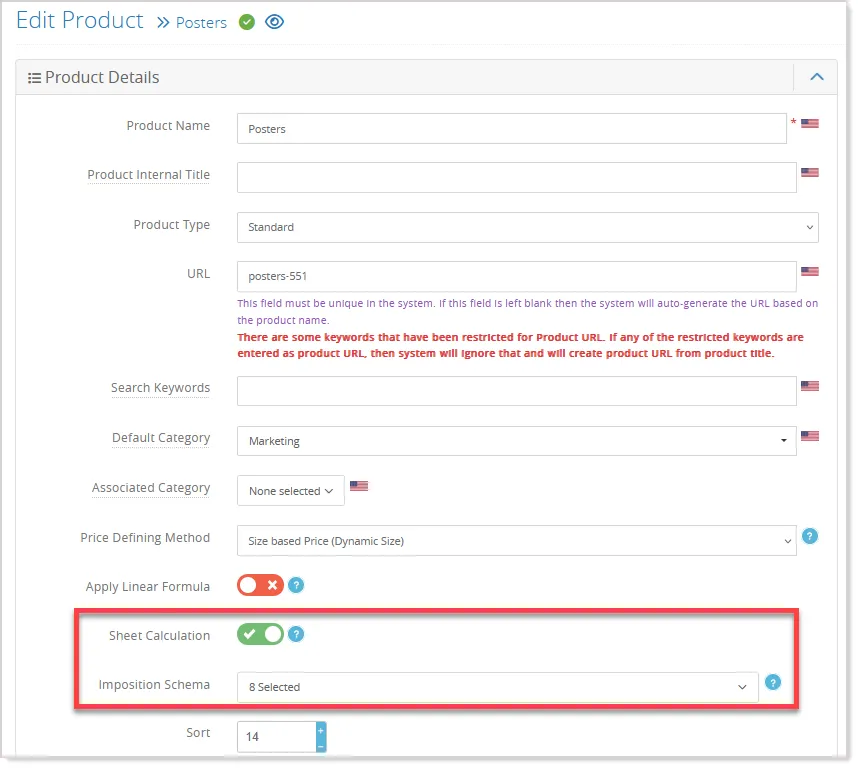
From the Edit Product screen, enable the Sheet Calculation option and then assign the required schemas and save the product configuration:
In Sheet Size Management under the Imposition module, sheet sizes can now be linked with specific product option attributes:
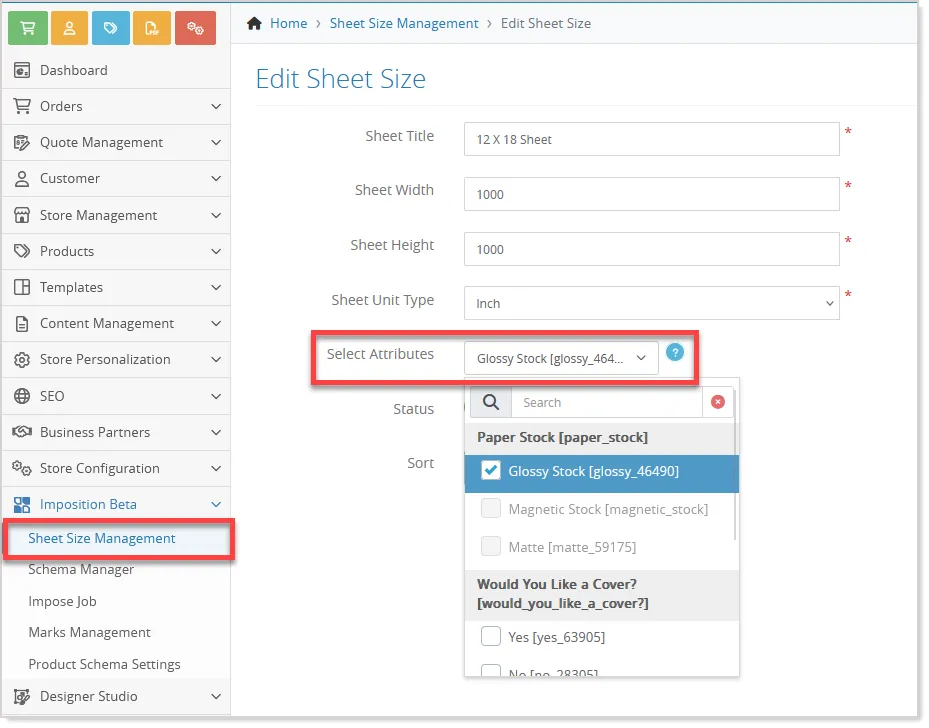
For example, multiple sheet sizes such as 12 × 18 and 13 × 19 can be mapped with the same paper type attribute, like Gloss. This allows the system to automatically evaluate all relevant sheets when that option is selected on the storefront.
Next, the Sheet-specific pricing can be configured from Product Options --> Select Options -->Action dropdown --> Attribute Price:
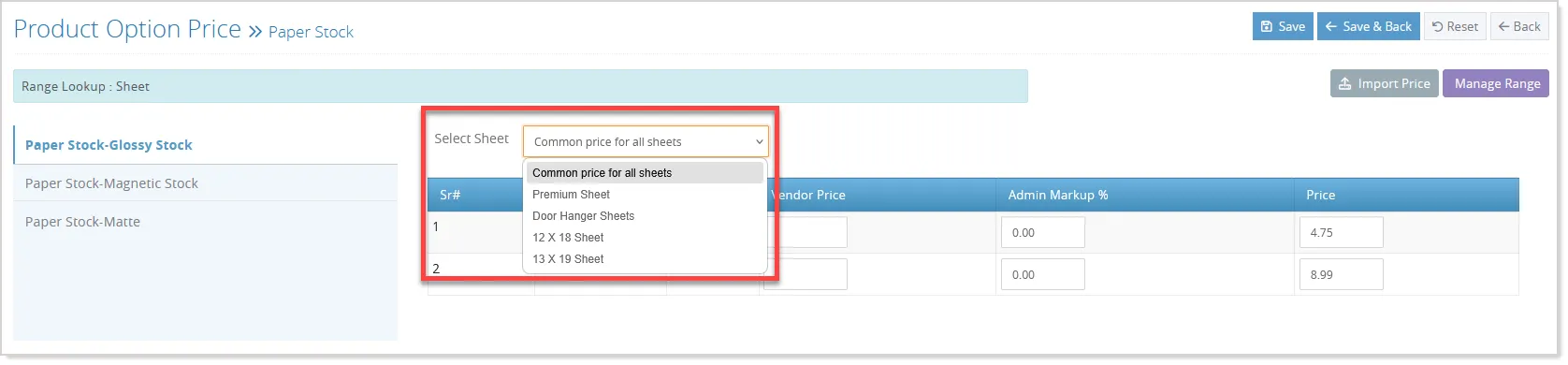
Different prices can be assigned for different sheet sizes, while the Common Price for All Sheets option works as a fallback if no sheet-specific pricing is available. Pricing can also be imported using Sheet ID mapping.
During storefront ordering, the system automatically compares the assigned schemas, evaluates sheet utilization and wastage, and selects the most suitable sheet for pricing and production. This logic also applies when designs are updated through Designer Studio, Upload Center, or reordered workflows, ensuring consistent and accurate pricing throughout the process.
Improved Stock Deduction and Warehouse Tracking
Stock management capabilities have been enhanced to improve inventory tracking, warehouse visibility, and stock deduction accuracy across ordering workflows.
Manage Stock Screen Enhancement
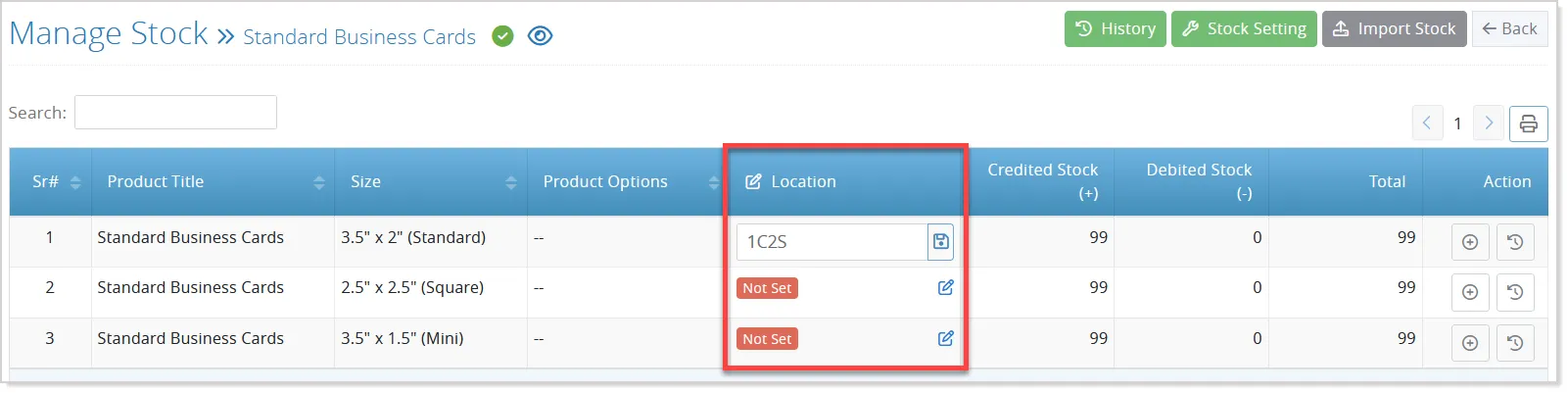
With this enhancement, admins can now define stock locations for individual product combinations directly from the stock management screens:
The stock locations can be managed at the product option level as well:
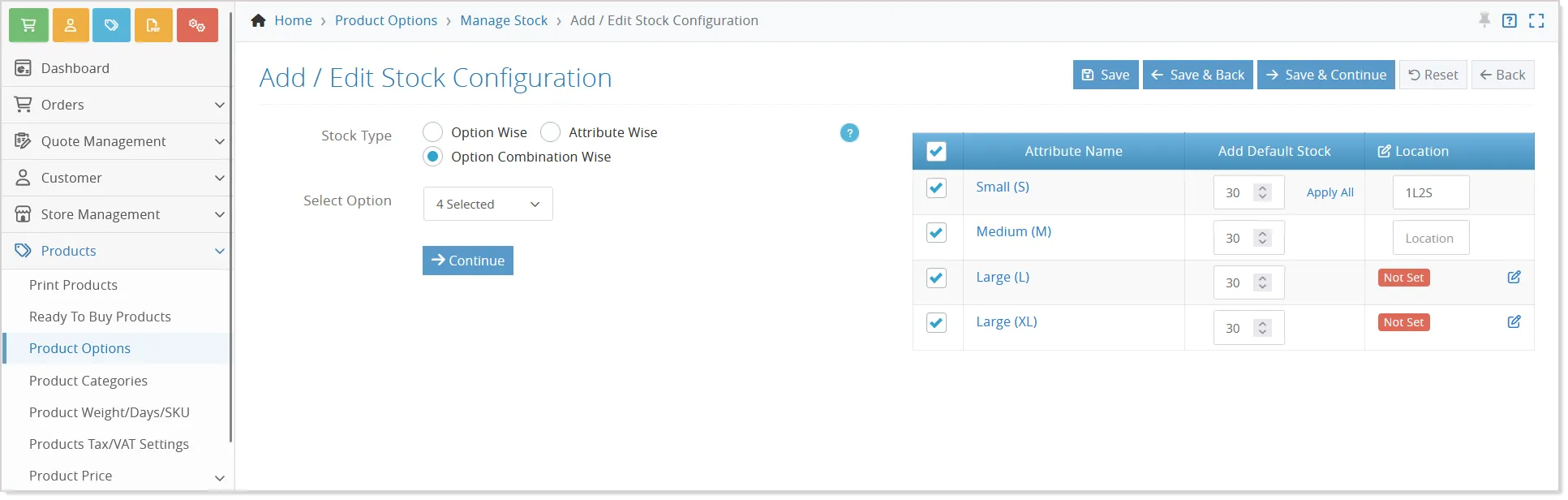
Location details can be mapped combination-wise for product options, attributes, and sizes, making it easier for production and warehouse teams to identify where inventory is physically available.
Bulk update support has also been introduced, allowing location details to be applied across multiple combinations simultaneously, while still providing flexibility to update specific combinations individually when required.
Stock Management in the Modify Order screen
Modify Order workflows have also been improved. When product sizes or combinations are updated, the system now recalculates stock updates accordingly and refreshes the related stock location information within the order.
Additional provisions are available to manually update stock locations for order products whenever necessary.
Stock Management in the Quote-based Order
The enhancement further extends stock management to quote-based ordering workflows. With the new SKU-based deduction logic, the system can now map product SKU combinations with stock records and automatically reduce stock once the order is placed. This helps maintain more accurate stock availability across both direct and quote-driven ordering flows.
Additional improvements include stock location support for Store Admin approval workflows and front-side modify order approval processes, ensuring stock visibility remains consistent throughout the entire order lifecycle.
Flexible Reset Options for Promotional Product Configuration
We’ve enhanced the Reset Configuration functionality for promotional products to provide greater control and flexibility. Previously, the reset option cleared all configuration data at once, with no ability to selectively reset specific elements such as images or colors.
With this update, clicking the Reset Configuration button now opens a pop-up with selectable options, including Background Images, Colors, Additional Background Images, and Product Box. Admins can choose the specific elements they want to reset, instead of resetting everything:
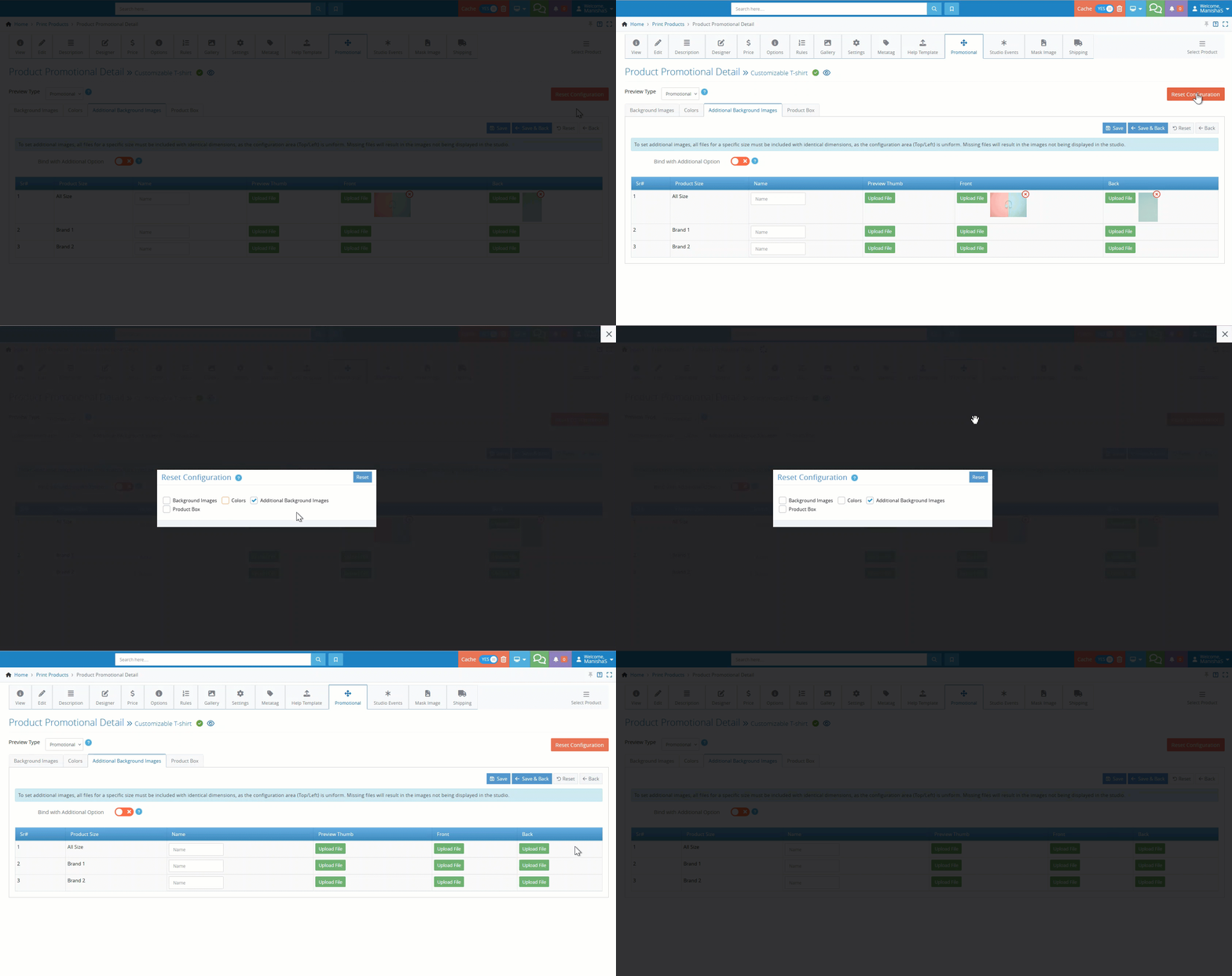
By default, all options remain selected to maintain the existing behavior, allowing a full reset if no changes are made. This enhancement enables more precise configuration management, reducing effort and improving efficiency while updating promotional products.
Product Gallery Image Management Optimization
Product Gallery Image management in the admin panel has been refined with an improved UI/UX experience for easier and more efficient image handling. The enhancement introduces a cleaner Add/Edit Image modal with better alignment, spacing, and streamlined field organization while maintaining all existing product gallery logic and behaviour.
The gallery display has also been upgraded from a grid layout to a table listing view, making it easier to manage large image collections:
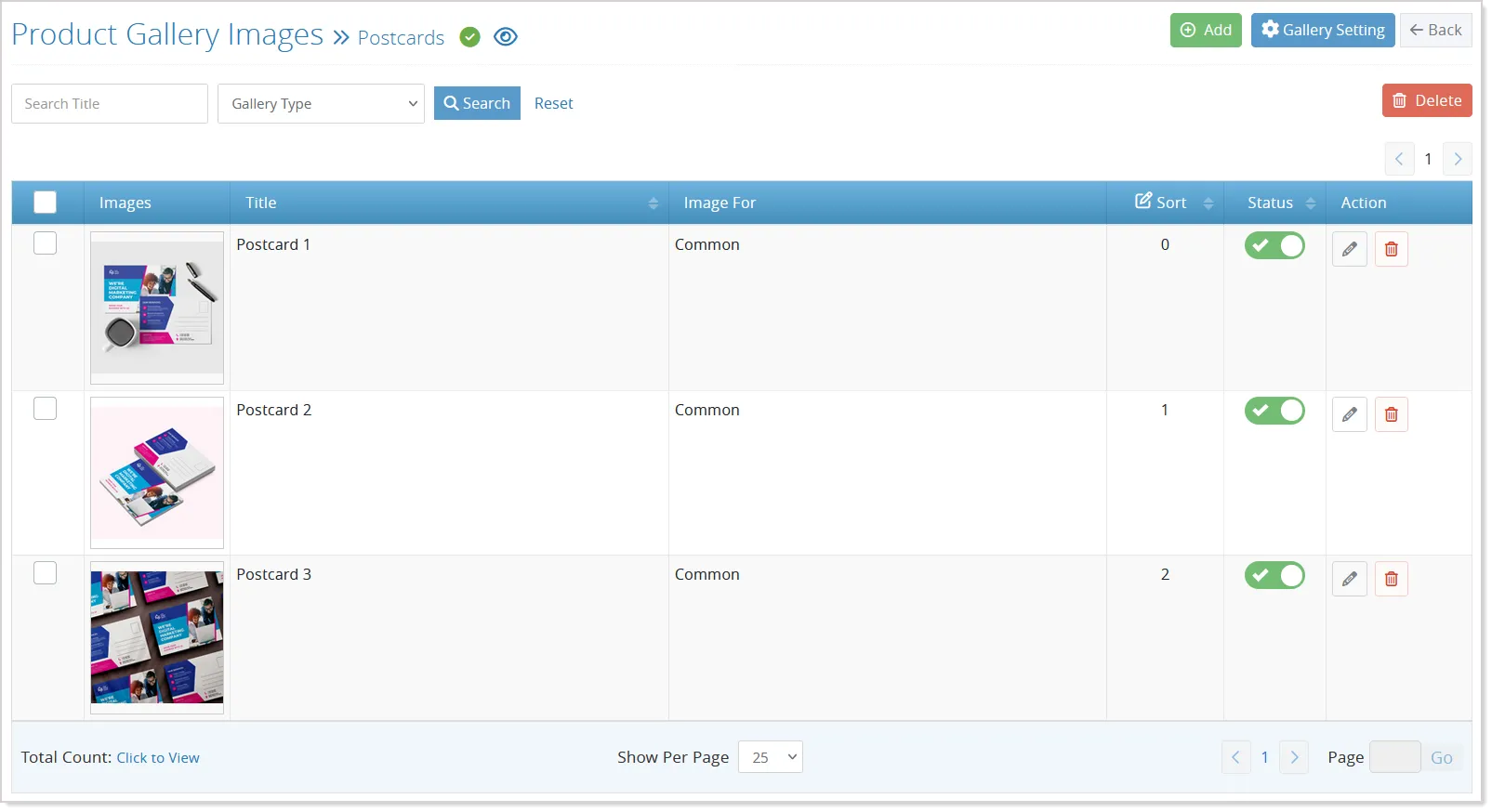
The new listing includes image thumbnails, title, image type, sort order, status, and quick action options for editing or deleting images.
Support for single and multiple image deletion, status updates, and improved editing flow helps simplify overall gallery management and improves usability across different Product Gallery Settings.
Bulk Pricing Update Across Pricing Screens
Bulk Pricing and Range Management capabilities have been extended across multiple pricing screens to simplify large-scale pricing updates and improve consistency in quantity range management.
A new “Add Bulk Data” option is now available on Product Mailing (New with mailing, postage price), Master Option Range management, and Quantity-based Product Price in Size-based Price screens, allowing users to quickly add or update pricing ranges through a unified bulk input interface.
The enhancement also introduces smart merge logic for quantity-based pricing. When uploaded ranges match existing records, the system updates the existing pricing instead of creating duplicates, while new ranges are added automatically.
Invalid or overlapping entries are skipped based on validation rules, helping maintain cleaner pricing data and reducing manual effort across pricing management workflows.