Admin Panel
LLMs.txt Support for Better AI Visibility
OnPrintShop now introduces LLMs.txt generation for public stores, giving admins better control over how store content is presented for large language models and AI indexing. This feature allows you to curate and structure key store information, such as products, categories, and content pages, into a single, well-formatted LLMs.txt file.
This functionality is available only for public stores.
To get started, the admin can navigate to the SEO section in the admin panel and then select the Sitemaps menu. A new tab LLMs.txt has been introduced:
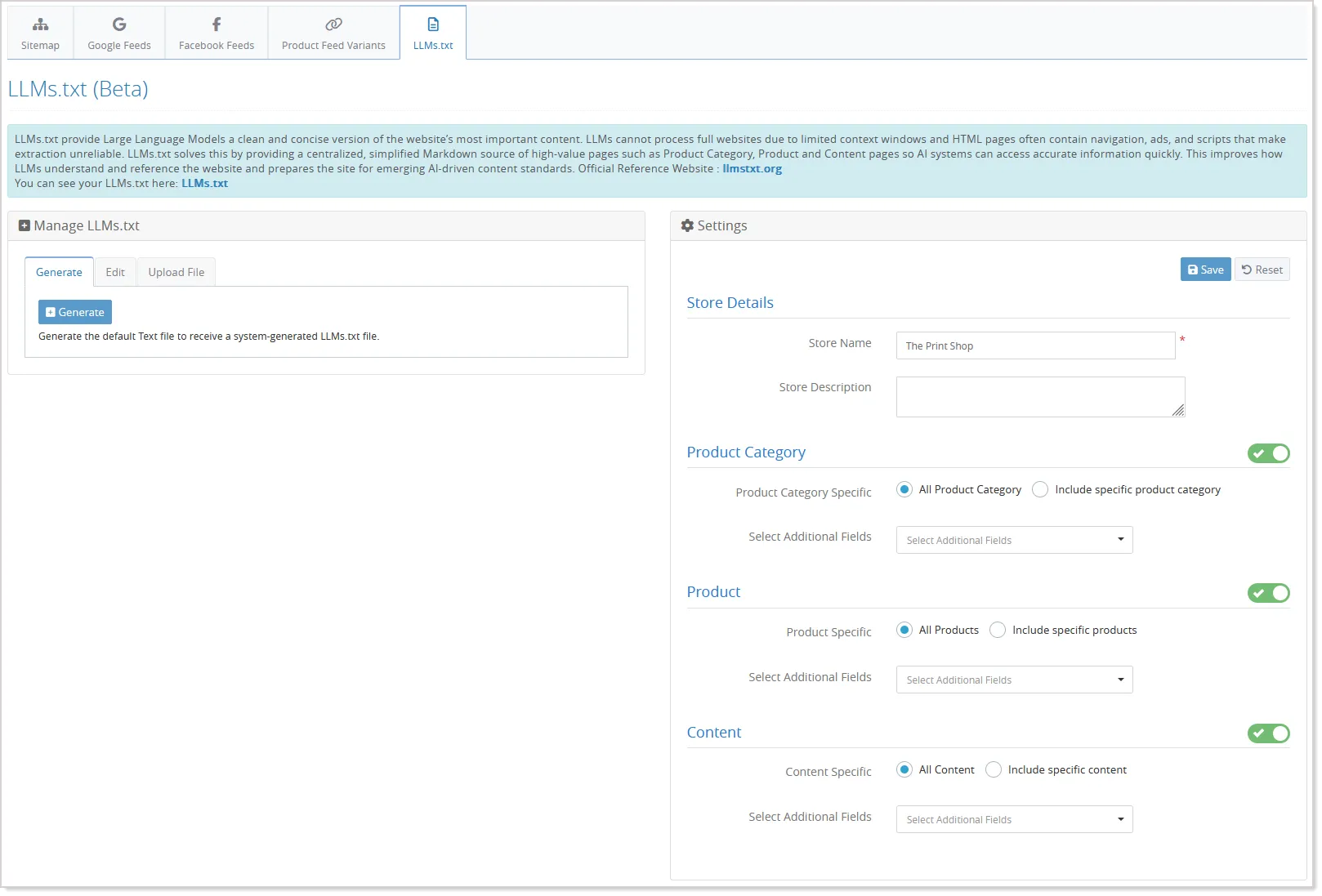
Start the configuration by adding the Store Name and Store Description, which will appear at the top of the LLMs.txt file and help clearly identify the store.
From there, the admin selects which product categories, products, and content pages should be included. Each selected item is automatically listed in the LLMs.txt file in a structured format that displays the title, link, and a short description.
Depending on the section, additional details are included—for product categories, meta title and meta description; for products, details such as SKU, long description, meta title, meta description, size, and supported options (radio, checkbox, and dropdown); and for content pages, meta title and meta description.
For better control, each section - Products, Product Categories, and Content Pages - has an active status, allowing the admin to deactivate any section so its data is excluded from the LLMs.txt file.
The admin can verify the details and save the configuration. Next, you'll need to generate the TXT file to obtain a system-generated LLMs.txt file:
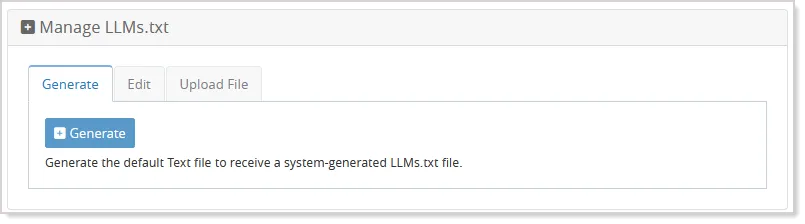
For the already-generated LLMs.txt file, the admins can view and edit the file or upload a completely custom LLMs.txt file if needed.
If the LLMs.txt file has not yet been generated but the settings are saved, the system will automatically generate it when the URL https://[domain]/llms.txt is accessed.
Admin User Drop Down Enhancement
n this version, the Admin User Dropdown in the Admin Panel has been enhanced to improve accessibility and centralize important links.
Previously, certain help-related links such as HTML Help, Help Doc Portal, and the Latest Version Release Page of the Help Documentation Portal were available in a standalone dropdown in the top header. With this update, the standalone dropdown has been removed and these links are now relocated to the Admin User Dropdown. Each link will be displayed with its respective icon and label, following the same presentation style used for existing options such as Admin Constant, Configure 2FA, and Set Favorite Links.
Additionally, the Help option within the dropdown now includes a submenu that provides quick access to two resources: HTML Help and the Help Documentation Portal.
A new option called “Feedback/Suggestion” has also been introduced in the Admin User Dropdown to collect user feedback.
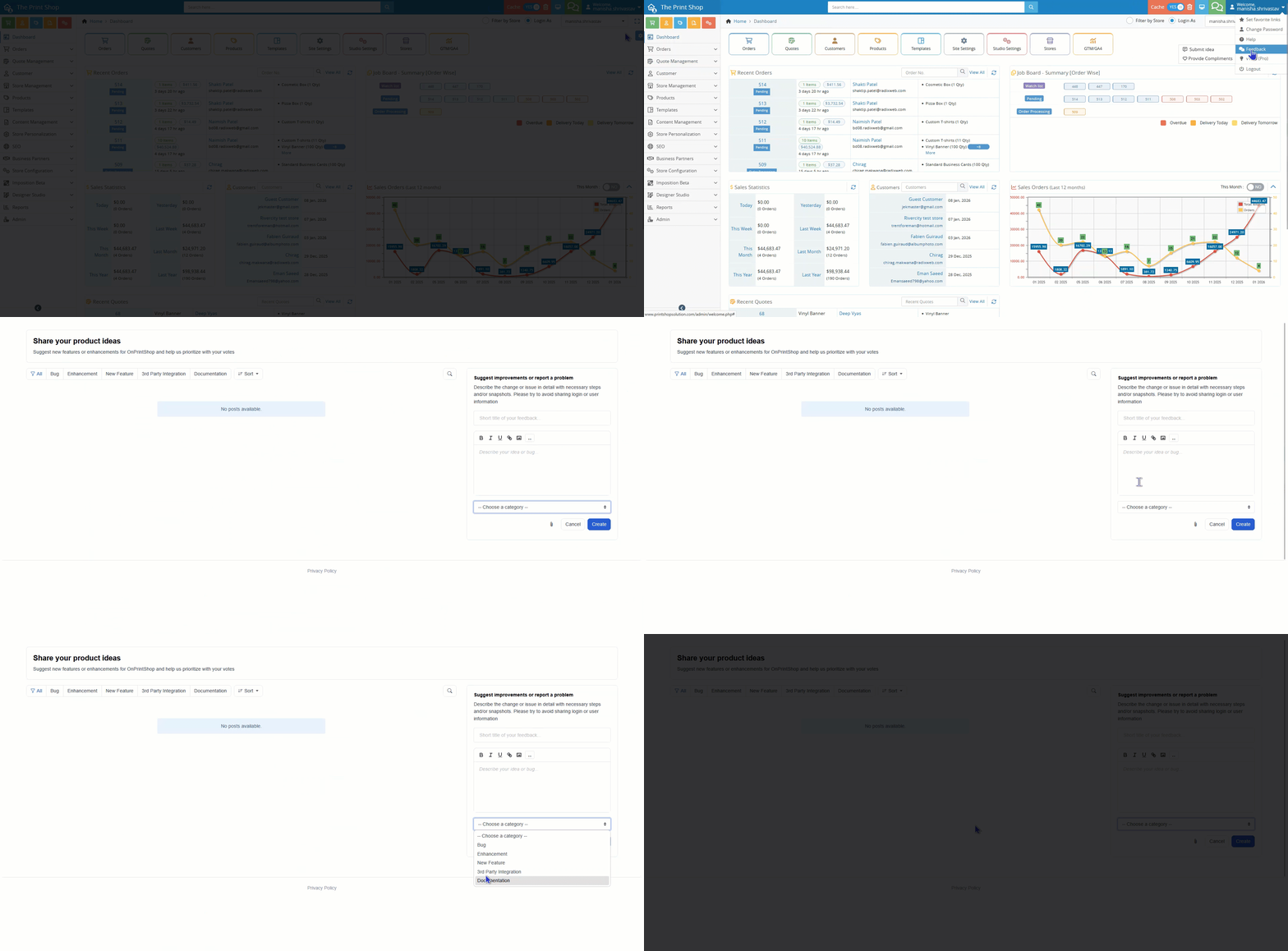
This option includes a submenu with the following actions:
- Provide Compliments, which redirects users to a Zoho Survey page where they can share feedback about the platform or services. The survey captures the Email ID and Store URL for identification purposes.
- Report a Bug, which opens the Productlift interface in a new pop-up or tab with the category “Bug” pre-selected, allowing users to report issues directly.
- Suggest a Feature/Enhancement, which opens the Productlift interface with the category “Feature” pre-selected, enabling users to submit feature requests or improvement suggestions.
Enhanced Package Calculator & Shipping Costs
The Package Calculator has been enhanced to improve the accuracy, efficiency, and usability of the existing package dimension calculation system. This update streamlines how package attributes (such as weight and dimensions) and product options are processed to determine the optimal shipping packages. The new system ensures that package configurations are calculated more effectively, providing a better experience for both admins and customers.
To get started with the enhanced Package Calculator, navigate to the Store Configuration --> Shipping Method --> Package Configuration --> Package Calculator tab.
From the Package Details section, start by selecting the Shipping method and then select the Existing product type.
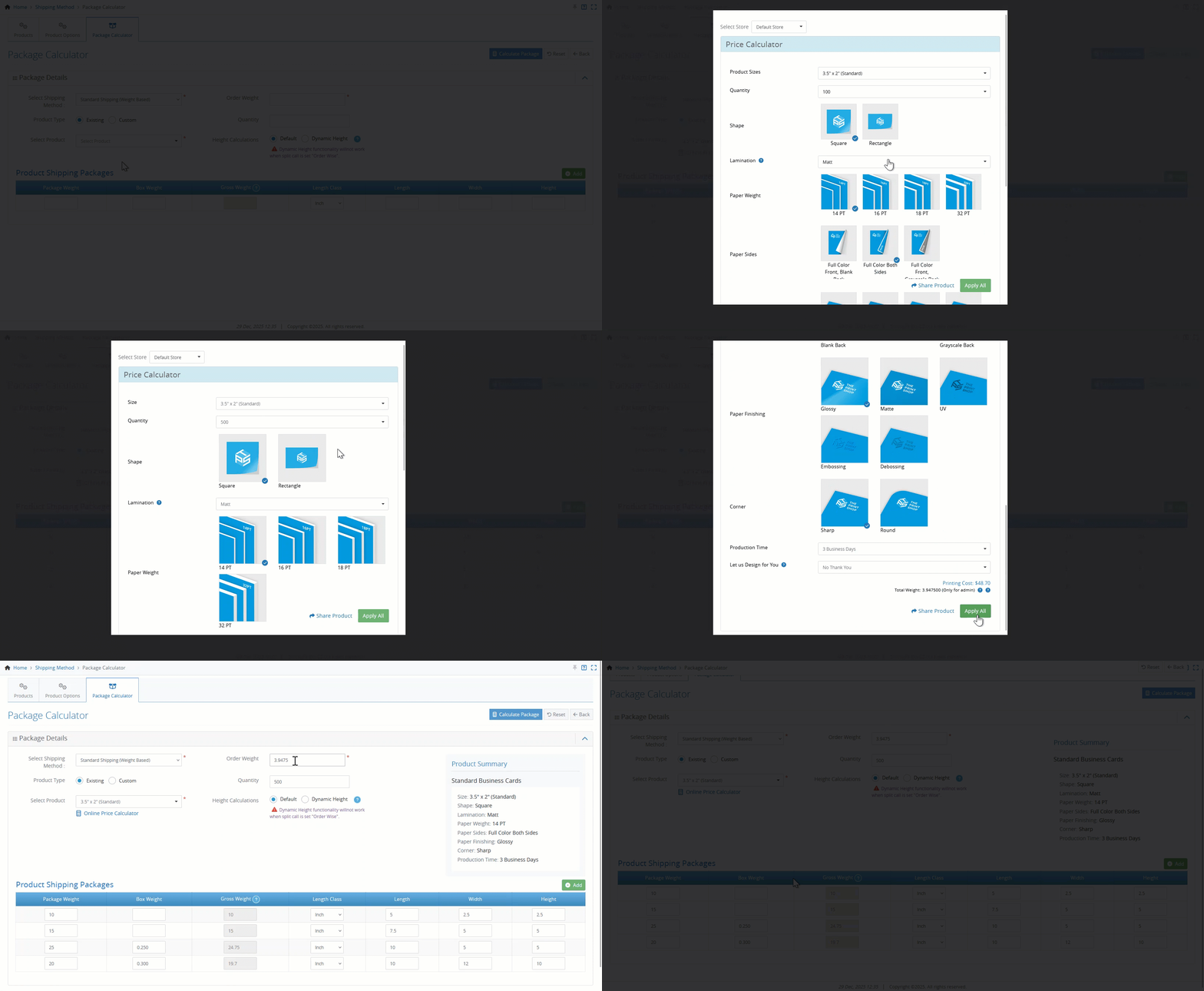
- When you select a product, the Price Calculator will open in a pop-up window, allowing you to begin the configuration process. From there, choose the desired product options and click on the Apply All button.
- The system will automatically populate the Weight text box based on your selections, but you can adjust the weight manually if needed.
- The available Product Shipping Packages will be generated based on the product, selected options, and shipping method.
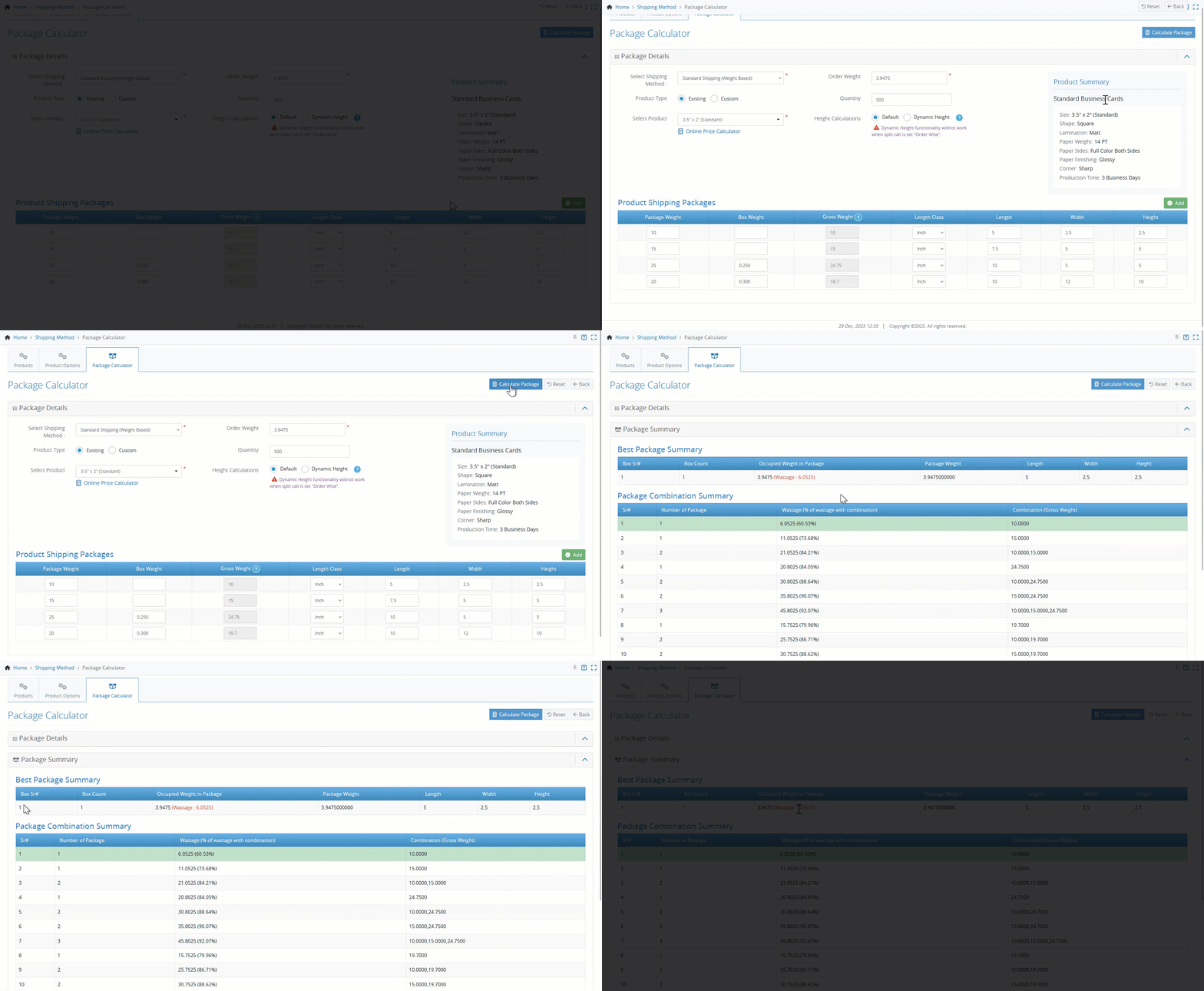
- Once you’ve made your selections, click on the Calculate Package button.
- If any packages are associated with the chosen product options, the Best Package Summary will be displayed, providing an overview of the most efficient shipping package.
- The Best Package Summary now includes a Box Count column. For standard packages, this will always show "1". However, for packages that use product options, the number of boxes required will be displayed. This addition helps admins better understand how many boxes are necessary for each product configuration.
Lastly, the Package Configuration UI has been updated for better alignment and readability.
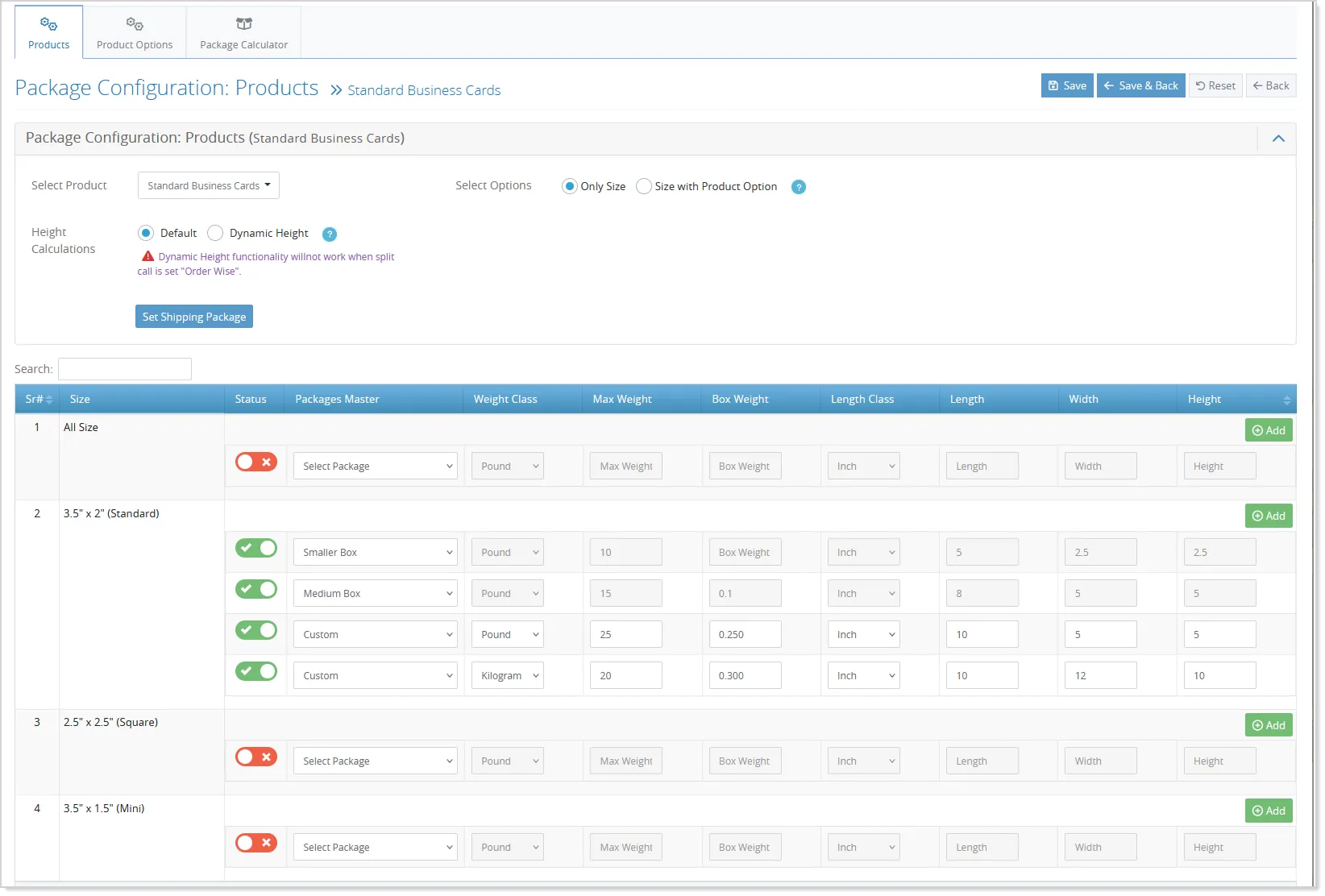
The layout now displays product options with their sizes, rather than in separate columns, which simplifies the review process. This improvement ensures that all package-related information is easy to navigate and understand, making the admin’s job quicker and more efficient.
Charge Customers Based on Actual Cuts
OnPrintShop now supports calculating cutting costs based on imposition sections, allowing charges to be derived from the number of rows and columns created on a printer’s sheet. This enhancement helps apply more accurate cutting charges by billing only for the required cuts instead of a fixed lump-sum cost.
With this enhancement, the cutting cost is added as an additional price component to the total product cost and is configured as an Admin Only master option using a formula-based pricing method.
Two new dynamic variables are introduced: {rows_per_sheet} and {columns_per_sheet}, which automatically calculate the number of rows and columns based on the selected sheet size and product dimensions.
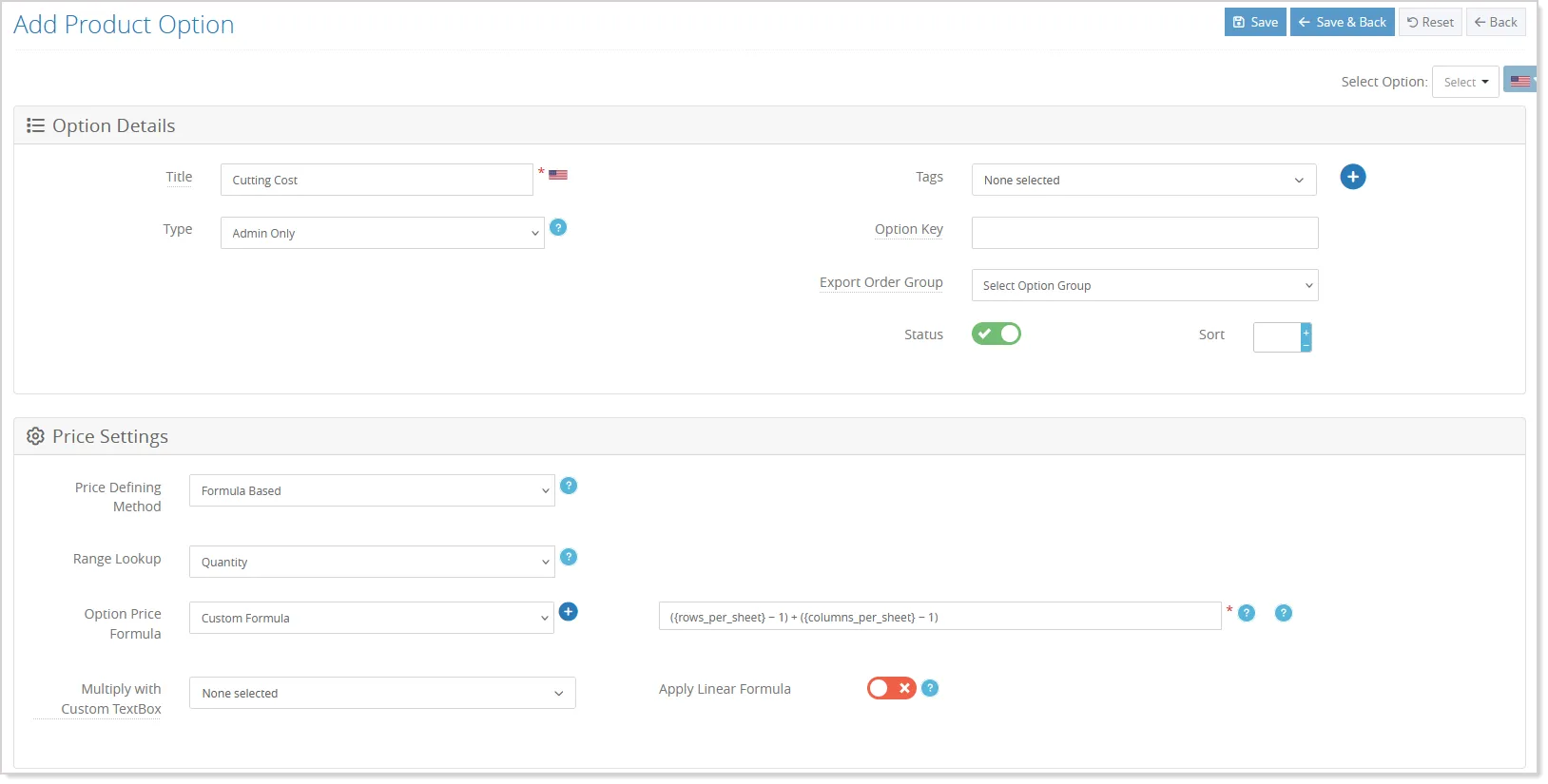
These variables can be used directly in the pricing formula to derive the cutting cost.
To enable this calculation:
- The sheet calculation must be active for the printing product,
- A valid imposition schema must be configured, and
- The master option must be set to Formula-Based pricing with the required variables included.
When the product is ordered, the system automatically calculates the cutting cost based on the imposition details.